

Instead of manually checking AI answers every day, set up AI visibility email alerts that compare completed tracking runs and notify the responsible team when a defined decline persists. The workflow below separates genuine losses from failed checks, then sends an evidence-led email rather than an unexplained score change.
- Koalr fits marketing teams tracking brand appearances in AI answers, rather than measuring referral traffic alone.
- AI visibility email alerts need stable prompt sets, comparable runs and a defined decline rule.
- Track mentions, citations and recommendations separately; losing one does not prove you lost the others.
- Send evidence and an assigned owner, then suppress repeat emails until the incident changes.
Why this matters
An email saying your visibility fell is not enough. Your team needs to know which engine changed, which buyer questions were affected, and whether the brand disappeared, lost a citation or stopped being recommended.
Koalr fits marketing teams that need AI visibility tracking, not just referral reporting. It tracks how brands appear in answers from ChatGPT, Gemini, Perplexity, Claude, Copilot and Google AI Overviews. Use Koalr as the visibility layer; treat email delivery as a separate workflow unless your chosen setup explicitly supports both.
For your 2026 monitoring programme, define these distinctions before writing an alert rule:
- Mention: the answer names your brand.
- Citation: the answer references a source associated with your brand, such as your website.
- Recommendation: the answer presents your brand as a suitable choice for the question.
These signals answer different questions. A mention-only alert cannot tell you whether an engine stopped citing a particular page, while a citation-only alert cannot tell you whether the answer recommends a competitor instead.
Before you start
- Tracking access: access to your brand's answers, prompt sets, engine identifiers and collection timestamps. For automatic delivery, confirm that your source provides an authorised, machine-readable route your workflow can actually read.
- Delivery access: a scheduler or automation environment, persistent storage for previous results and incident state, and permission to send through your team's email service. Assign a recipient group and a named incident owner.
- The gotcha: an incomplete tracking run is not a visibility decline. Require a completion status, or check expected prompt coverage yourself, before comparing results.
This is an implementation-neutral setup, not a walkthrough of a native Koalr email feature. The field names below define your workflow's own data contract; they are not product menu labels or promised integration capabilities.
Confirm the data route before configuring email. A manually maintained worksheet can help you test the rules, but it does not make collection automatic. Automated alerts require automated access to completed results.
Configure the tracking input
Start with the evidence you need to inspect a decline. Do not build the workflow around a single aggregate score if the underlying answers are unavailable to the person receiving the email.
- Choose one stable prompt set covering a specific audience, market and language. Separate branded questions from unbranded buyer questions so that explicit requests about your brand do not obscure discovery performance.
- Record each result using your own fields:
run_id,collected_at,engine,prompt_id,prompt_text,market,language,run_status,mention_present,citation_presentandrecommendation_present. - Preserve the answer text and cited sources where your collection method permits it. Retain enough evidence to compare the previous answer with the current answer without reconstructing the result from memory.
- Add a prompt-set version. Change that version whenever you add, remove or substantially rewrite tracked questions.
- Configure the scheduler to retrieve the latest completed run through your verified data route. Store its identifier before evaluating the alert so the same run cannot be processed repeatedly.
Expected result: each scheduled check produces a dated record with a stable prompt identity, a known engine and inspectable evidence. A failed retrieval produces a collection error, not a zero-visibility result.
For 2026 comparisons, preserve the engine or model identifier wherever the source provides one. Do not silently pool results from different answer surfaces into one incident: a ChatGPT decline and a Google AI Overviews decline need separate evidence.
Define the baseline and decline rule
A useful alert compares like with like. Keep the engine, prompt set, market, language and metric unchanged between the baseline and the current run.
- Select one metric for the first rule, such as recommendation rate across completed prompts. Calculate it as positive results divided by valid completed results; exclude failed checks from both parts of the calculation.
- Choose a baseline made from comparable completed runs. Document whether it uses the previous run or a fixed reference window, and preserve the underlying results.
- Define what qualifies as a decline. Use an absolute threshold in percentage points for a rate, or an explicit lost-answer condition for a particular priority prompt.
- Require confirmation before sending a decline email. A practical starting rule is persistence across 2 completed runs, not an industry benchmark or a claim about statistical significance.
- Add a coverage gate. If expected prompts are missing, stop the visibility comparison and route the problem to the person responsible for collection.
Expected result: the rule produces one of three outcomes: no qualifying change, a confirmed decline, or a collection problem. Only a confirmed decline enters the visibility email workflow.
There is no universal drop threshold for a 2026 alert programme. Set yours from the importance of the monitored questions and the variation you observe in your own comparable runs, rather than borrowing an unsupported benchmark.
Choose an alert policy
Use one policy first. Add another only when it answers a distinct operational question.
| Policy | Best for | Advantage | Limitation |
|---|---|---|---|
| Aggregate decline | Teams monitoring a broad prompt cluster | Summarises movement across the tracked set | Can conceal a loss on one valuable question |
| Priority prompt loss | Teams protecting specific buyer questions | Identifies exactly which answer changed | Requires explicit ownership and careful confirmation |
| Competitor displacement | Teams inspecting recommendation changes | Highlights where another brand replaced yours | Requires answer-level classification, not just a brand count |
For priority buyer questions, start with a confirmed recommendation-loss rule. Use aggregate decline as a summary rather than the only condition that can notify the team.
Configure email routing and incident state
The email should create an investigation, not simply announce a number. Store incident state before delivery so retries do not create duplicate notifications.
- Create an incident key from the brand, engine, market, language, prompt-set version and metric. For a single-prompt alert, include the prompt identifier too.
- Read the previous incident state. Open a new incident only when the confirmed decline rule passes and no equivalent incident is already open.
- Build the message with the baseline period, current collection timestamp, metric definition, affected prompts and supporting answer evidence.
- Send through your authorised email service to the assigned owner and relevant team mailbox. Keep delivery credentials outside the message body and evidence records.
- Record the incident identifier, delivery outcome and send timestamp. Retry failed delivery against the same incident, rather than creating a new incident on every attempt.
Expected result: a qualifying loss creates one traceable incident and one initial email. The next unchanged low result updates the incident record without sending the same message again.
Use this message structure as your own template, not as a quotation from a product:
- Subject: AI visibility decline confirmed — engine, market and prompt cluster.
- What changed: name the metric and state the comparison periods.
- Where it changed: list affected prompts and distinguish mentions, citations and recommendations.
- Evidence: include permitted answer excerpts and source references from the recorded results.
- Owner: identify who checks the incident and records the next action.
- Next check: state when the workflow will reassess the condition.
Your 2026 email template should also identify the prompt-set version. That gives recipients a direct way to spot a measurement change before treating it as a competitive loss.
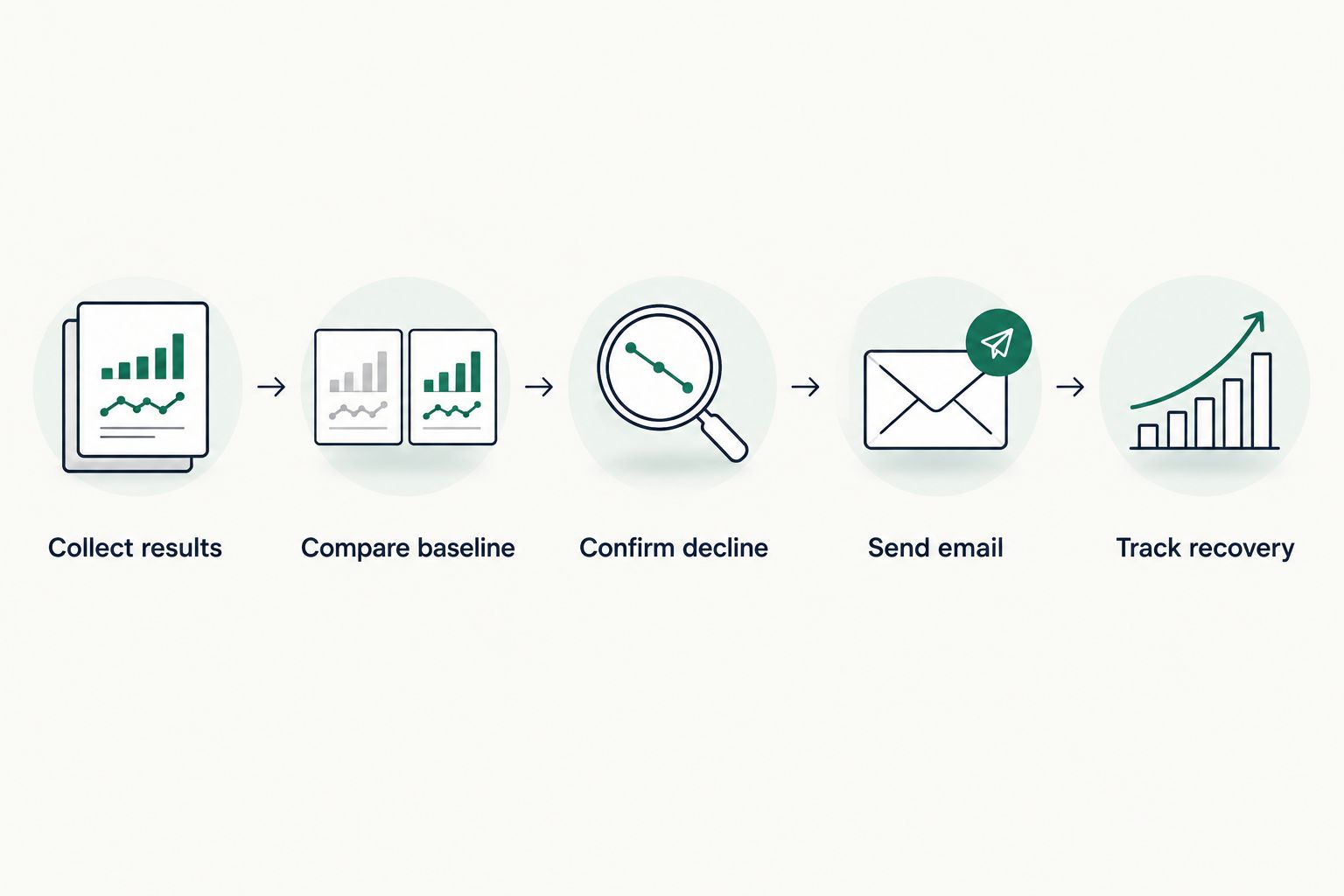
Keep the incident lifecycle explicit
Use the following states in your own workflow:
- Collect results: retrieve and validate completed evidence.
- Compare baseline: evaluate the same metric and scope.
- Confirm decline: apply the persistence rule.
- Send email: deliver evidence to the incident owner.
- Track recovery: keep the incident open until the recovery rule passes.
This sequence keeps delivery downstream of validation. A broken data feed belongs with the collection owner, not in a message claiming competitors have displaced your brand.
Test the workflow before enabling team delivery
A successful email test proves delivery works. It does not prove that your decline logic, completion checks or repeat suppression work.
- Create 3 test cases using clearly labelled synthetic records: a qualifying decline, an unchanged result and an incomplete run. Keep these outside live reporting.
- Verify that the decline opens an incident, the unchanged result sends nothing, and the incomplete run creates a collection warning rather than a visibility warning.
- Submit the same qualifying record again. Confirm that the stored run identifier and incident state prevent another initial email.
- Send a test to the actual team mailbox and check both delivery and readability. Confirm that the assigned owner can inspect the evidence without requesting additional access.
- Enable the schedule only after every case behaves as intended. Document the rule version alongside the test results.
Expected result: the team receives actionable messages for confirmed declines, while duplicate records and failed checks remain outside the decline inbox.
Set any follow-up reminder deliberately. For example, a 24-hour reminder is a proposed operating choice for an unresolved incident, not a required collection interval or a promise about answer freshness.
Send a recovery email when visibility returns
A recovery notification is the adjacent workflow that closes the loop. Without it, recipients cannot distinguish a resolved loss from an incident nobody has checked.
Evaluate recovery only against an open incident, using the same scope and metric as the original decline. Define a recovery condition separately from the decline condition so that a borderline result does not repeatedly open and close the incident.
Require confirmation across 2 completed runs as an initial policy, then send the owner a recovery message containing the original incident identifier and the new evidence. Close the stored incident only after recording the recovery outcome.
A recovery email means the measured condition recovered; it does not prove a content edit caused the recovery. Record content changes separately and compare their timing with answer-level evidence before drawing that conclusion.
Keep recovery messages narrower than the initial investigation email. State what recovered, which prompts still remain affected and whether the owner needs to continue checking a residual problem.
Troubleshooting
Every check sends the same decline email
The workflow is evaluating the threshold without checking incident state, or it is processing the same run repeatedly. Persist both the run identifier and the incident key, then send the initial notification only when the incident changes from closed to open.
Visibility falls to zero after collection fails
Failed or missing checks have been treated as negative answers. Preserve completion status, reject incomplete comparisons and notify the collection owner separately; do not rebuild the baseline from those failed records.
The alert fires after prompts are edited
The comparison is mixing different prompt-set versions. Start a new comparable baseline or compare only the unchanged subset, and label the measurement change in the record.
The email arrives without usable evidence
The message contains a score but omits the answers or recipients lack access to the stored records. Include permitted excerpts and exact scope, then test access from the recipient's account before enabling live delivery.
Recovery and decline messages alternate
The opening and closing rules sit too close together or lack confirmation. Separate the recovery condition from the decline condition and apply persistence to both, while leaving the incident open during inconclusive checks.
Customise your workflow
Once one rule works, extend coverage by business responsibility rather than sending every change to everyone. Route product questions to product marketing, factual errors to communications, and collection failures to the workflow owner.
For your next 2026 iteration, add engine-specific rules and separate branded from unbranded prompt clusters. Keep market and language visible in the message so local teams receive evidence relevant to their remit.
Use the deeper guide on setting up AI visibility alerts for your brand to expand alert scope. Retest each new rule against unchanged results, incomplete collection and duplicate delivery before adding recipients.
Koalr's role is AI visibility tracking across the named answer engines. The benefit is monitoring brand appearances rather than relying on clicks alone; the boundary is that tracking data still needs a verified delivery route, explicit alert logic and a human owner to become an operational email workflow.
FAQ
How do I automatically email my team when AI visibility drops?
Connect completed tracking results to a scheduled workflow, compare them with a stable baseline and send email only after a defined decline is confirmed. Store incident state so repeated low results do not create duplicate initial notifications.
Does Koalr provide the email integration described here?
This guide does not describe a native Koalr email integration. It defines a separate workflow around AI visibility data; verify your available data access and delivery route before implementing it.
What should AI visibility email alerts measure?
AI visibility email alerts should measure a defined signal: mentions, citations or recommendations. Keep the engine, prompt set, market and language consistent so the comparison describes the same thing.
What is the best threshold for an AI visibility decline alert?
The best threshold is one defined against your own comparable results and the importance of the monitored questions. There is no universal threshold established here; document whether your rule uses percentage-point change or a specific answer-level loss.
Should a failed tracking run trigger a visibility alert?
No, a failed tracking run should trigger a collection warning rather than a visibility-decline email. Missing evidence does not establish that the brand disappeared from the answer.
Can AI referral traffic replace visibility monitoring?
No, referral traffic records visits, while visibility monitoring records appearances in answers. A citation, mention or recommendation can exist without producing a visit to your website.
How do I stop duplicate AI visibility emails?
Store a unique run identifier and an incident key, then send the initial email only when a new incident opens. Update an existing incident without repeating the initial notification unless your escalation policy explicitly requires it.
Should I send an email when AI visibility recovers?
Yes, send a recovery email when the same metric and scope satisfy your documented recovery condition. Include the original incident identifier and current evidence, without claiming that a particular edit caused the recovery.
One last thing
The most useful visibility email names the lost buyer question, not just the falling score. Require every incident owner to record one decision: investigate the cited sources, correct a factual error, review the relevant page or close the incident with an evidence-based explanation.
That decision turns a notification into accountable work. Keep it attached to the incident so the next decline starts with context rather than another unexplained email.