

Instead of manually switching between crawler checks and AI answers, use a shared page-level workflow to connect Bing indexing evidence with Koalr visibility tracking. Treat the Koalr Bing Webmaster Tools integration as an operational workflow—not a presumed native connector—so you can fix access problems and measure answer visibility separately.
- Use a Koalr Bing Webmaster Tools integration workflow to connect crawl checks with AI visibility measurement.
- Bing Webmaster Tools diagnoses Bing crawling and indexing; those checks do not prove an AI citation.
- Koalr is best for marketing teams tracking their brand in AI answers.
- Keep URLs, prompts and review dates consistent; record technical fixes separately from mentions, citations and recommendations.
Why this matters
An indexed page is not the same as a cited page. Bing Webmaster Tools helps you investigate whether Bing can discover, crawl and index your content. AI visibility tracking asks a different question: does an answer name your brand, cite your page or recommend your business?
Koalr is best for marketing teams tracking their brand in AI answers. Its role in this workflow is answer visibility, not replacing the technical checks in Bing Webmaster Tools.
Keep those responsibilities separate in your 2026 reporting. A crawl fix establishes a technical change; an answer observation establishes a visibility result. Putting both in one record makes investigation easier, but it does not prove that one caused the other.
| Tool | Best for | Useful evidence | Strength | Limitation |
|---|---|---|---|---|
| Koalr | Marketing teams measuring AI answer visibility | Brand appearances across supported answer platforms | Focuses on what answers say about your brand | Answer visibility does not establish Bing crawl status |
| Bing Webmaster Tools | SEO teams investigating Bing access and indexing | URL inspection and sitemap information | Helps diagnose technical barriers to Bing discovery | Bing indexing does not establish a citation or recommendation |
Use both for diagnosis; do not combine their results into a single success metric. Otherwise, your team risks celebrating an indexing improvement while the buyer-facing answer remains unchanged.
Before you start
- Secure access: Have access to the relevant brand workspace and a verified site in Bing Webmaster Tools. Assign someone who can change website content, indexing directives and server settings, or route those changes to the responsible team.
- Prepare the materials: Collect the final URLs you want indexed, the relevant sitemap location, buyer prompts, target market and language. Start with a recommended pilot of 10 priority URLs and 5 buyer prompts; these are setup choices, not performance benchmarks.
- Check the non-obvious gotcha: Decide which URL represents each page before comparing results. Redirects, canonical tags and tracking parameters can make different tools appear to describe different pages. Keep brand mentions without citations in a separate brand-level record rather than assigning them to an unproven source URL.
This guide uses a shared worksheet or task record as the connection between the tools. It does not depend on API access, automatic exports or a specific connector. You can run the process without assuming any of those features.
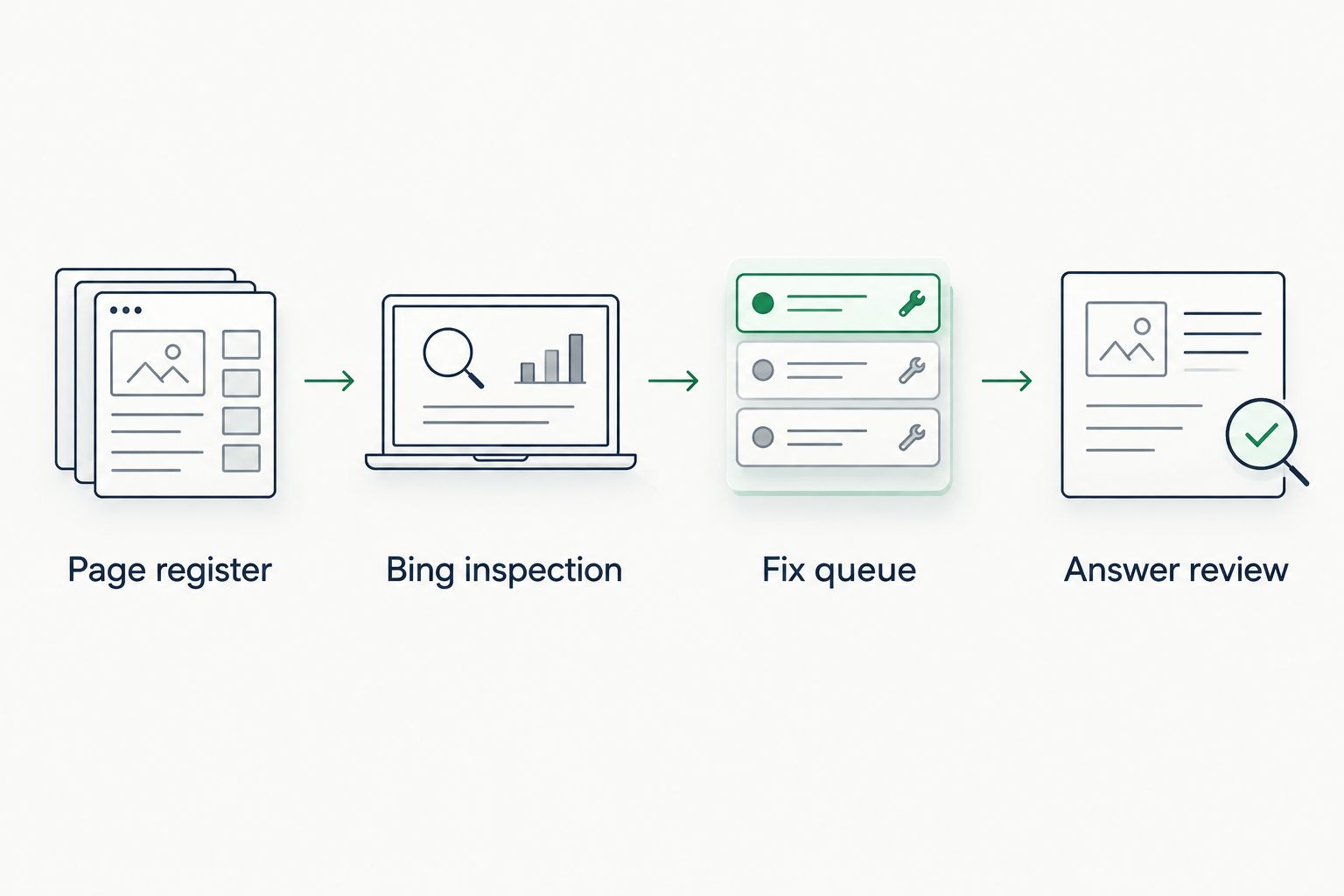
Page register
A page register gives the crawler workflow a stable unit of work: the final URL. Build it before making changes, so the technical owner and marketing owner investigate the same content.
- Create one record per final URL. Include the page purpose, target buyer question, intended canonical URL, technical owner and content owner. Add separate fields for inspection date, change date and answer review date.
- Attach the relevant prompts. Write the actual questions buyers ask about the page’s topic. Keep branded prompts separate from unbranded discovery prompts; naming your brand in a question changes what the answer is being asked to do.
- Record a baseline. Capture the answer platform, prompt wording, market, language and observation date. Save the answer text and source references where accessible, then classify the brand’s appearance using the definitions below.
Use mention for an appearance of the brand name, citation for an explicit source reference to the brand’s content, and recommendation for an answer that advises choosing the brand. These outcomes can overlap. Store them separately rather than forcing every answer into one exclusive category.
For the 2026 baseline, preserve negative results too. An answer that recommends a competitor but omits your brand is useful evidence; deleting it would make the next comparison misleading.
Expected result: Each priority page has a stable URL, an owner and relevant prompts, while brand-only observations remain identifiable without an invented page attribution.
Bing inspection
Use Bing Webmaster Tools to establish the technical state of each priority URL. Inspect the actual destination page, not a campaign URL or an outdated address remembered by the team.
- Select the correct verified site and open
URL Inspection. Enter the final URL from your register. Record the indexing information and any reported crawl or indexing issues, including the date of the check. - Investigate access and indexing directives. Check the page response, redirects, robots directives and canonical tags against the intended behaviour. For a page intended for public search, a
200HTTP response is an appropriate starting check, but that response alone does not prove indexability. - Open
Sitemapsand review the relevant sitemap. Check whether it contains the intended canonical URLs and whether Bing reports processing problems. Correct the underlying sitemap or page issue before treating another submission as the solution.
Distinguish discovery from inclusion. A sitemap helps a search engine discover URLs; it does not guarantee indexing. Likewise, a canonical tag indicates a preferred URL, but search engines determine which URL they actually select.
Do not remove a deliberate exclusion just to improve a dashboard. Private content, duplicate pages and pages with no search purpose need different treatment from public commercial or explanatory pages.
For deeper checks, use the guide to audit technical readiness for AI crawlers. Bingbot access is one crawler question, not evidence that every answer platform can retrieve the same content.
Expected result: Each inspected URL has a recorded technical status and a specific next action, rather than a generic instruction to “improve crawlability”.
Fix queue
Turn inspection findings into tasks with acceptance criteria. A task is complete when the underlying condition is corrected and checked—not when someone presses a submission button.
- Separate technical faults from content gaps. Assign blocked access, broken redirects and conflicting indexing directives to the technical owner. Assign unclear answers, unsupported claims and missing buyer information to the content owner.
- Write a testable acceptance condition. For example, require the intended final page to return its expected response, remove an unintended
noindexdirective, or correct a canonical tag pointing to an unrelated page. State the actual condition found on that URL. - Publish and record the change. Save the deployment date, changed element and final URL. Recheck the live page and repeat URL inspection as appropriate. Use Bing’s indexing submission functions only after the page is ready for indexing.
Do not submit a broken page repeatedly and call it a crawler workflow. Submission does not repair blocked access, contradictory directives or missing content.
Keep technical and editorial changes in separate task entries even when they share a deployment. If both change together, your record should say so; the later visibility result cannot isolate their individual effects.
For your 2026 change log, use exact dates rather than labels such as “recently updated”. Dates let the next reviewer distinguish an answer observed before a deployment from one observed afterwards.
Expected result: Every fix has an owner, a published change and a checked acceptance condition. Unresolved problems remain open instead of disappearing into a completed audit.
Answer review
Return to the original buyer questions after the technical work. Keep the comparison conditions stable; otherwise, you are comparing different searches rather than observing a page’s progress.
- Repeat the baseline prompts. Keep wording, platform, market and language consistent with the initial record. Use Koalr for AI visibility tracking across the relevant supported platforms, and preserve the observation context alongside each result.
- Review the answer and its sources separately. Record whether the brand is mentioned, cited or recommended. When the answer references your content, compare the cited URL with the final URL and canonical relationship in your register.
- Compare without claiming causation. Place the technical status, published changes and answer observations side by side. Describe what changed and what did not; a later citation does not by itself prove the crawler fix produced it.
Choose a repeatable review cadence. A 7-day review interval is a practical starting schedule for the pilot, not a promise that indexing or answer visibility will change within that period. Record results even when nothing moves.
For 2026 reporting, keep the denominator visible. “Appeared more often” is incomplete unless the prompt set and platforms stayed consistent or the report explains their changes.
Expected result: You have comparable answer observations linked to a dated page history, with indexing progress and answer visibility reported as separate outcomes.
Repeat the workflow whenever a page changes
The adjacent workflow starts with publication rather than an answer visibility problem. Use it after a content refresh, URL change or website migration, when old inspection records no longer describe the current page.
- Add the change date and reason to the existing record; do not overwrite the baseline.
- Confirm the final URL, redirect destination and canonical relationship after publication.
- Review sitemap inclusion and inspect the destination page in Bing Webmaster Tools.
- Repeat the original buyer prompts and compare the answer’s cited sources with the page history.
Best for: teams publishing frequent content updates. This variant catches technical problems introduced during editing and preserves the evidence needed to assess later answer changes. Its limitation is attribution: simultaneous changes to wording, URL structure and internal links prevent a clean assessment of each change’s effect.
Keep a migration review separate from a routine content review. A successful redirect and an accurate answer recommendation are different acceptance conditions, even when both belong to the same launch.
Troubleshooting
Bing reports an access problem, but the page opens in your browser
Check authentication, firewall rules, bot protection and server responses with the technical owner. A browser session can have cookies or permissions a crawler does not have. Confirm the reported issue against the live configuration before changing access rules.
The page is in the sitemap but is not indexed
Inspect the URL and check indexing directives, canonical relationships and the page itself. Sitemap inclusion is discovery evidence, not an indexing guarantee. Fix a documented problem before resubmitting; do not set an arbitrary deadline for inclusion.
An answer cites a different version of the URL
Compare the cited address with redirects and canonical tags. Preserve both the observed address and the intended final URL in your record. Only group them when you have established the relationship; similar-looking paths are not enough.
Technical checks improve, but your brand stays absent
Review whether the page actually answers the tracked buyer question and whether the answer cites other sources. Keep the technical improvement as a completed result, but leave the visibility objective open. Indexing eligibility is not a recommendation.
Results differ between repeated answer checks
Confirm that the prompt, market, language and platform are unchanged, then preserve each observation. Answer output can vary, so use repeated observations rather than declaring a trend from one response. Also distinguish a changed answer from a changed prompt set.
Customise your workflow
Expand the pilot by business question, not by adding every URL on the site. Give each page cluster a buyer intent, a content owner and a technical owner; this keeps the workflow actionable when the register grows.
Keep commercial evaluation prompts separate from informational prompts. A page that answers a definition question and a page intended to support a supplier decision need different content reviews, even when both are technically indexable.
Your 2026 dashboard should retain separate views for technical readiness and answer outcomes. Koalr’s AI visibility evidence belongs beside the Bing checks, not inside a metric that treats indexed pages as successful recommendations.
FAQ
How do I set up a Koalr Bing Webmaster Tools integration workflow?
Connect the work through a shared page register: record priority URLs, inspect them in Bing Webmaster Tools, fix documented issues and review the same buyer prompts in Koalr. This workflow does not require assuming a native connector or automatic data sync.
Does Bing indexing mean my brand will appear in Microsoft Copilot?
No. Bing indexing does not prove that a particular Copilot answer will mention, cite or recommend your brand. Record the answer outcome separately from the page’s indexing status.
Do I need an API to follow this guide?
No. You can run the workflow with tool access and a shared worksheet or task record. Add automation only after confirming the supported interfaces and permissions.
What is the difference between a mention and a citation?
A mention names your brand; a citation explicitly references a source. An answer can name a business without citing its website, so those observations need separate fields.
How often should I review the crawler workflow?
Start with a seven-day review interval for the pilot and repeat technical checks after relevant deployments. That interval is a scheduling recommendation, not an indexing or visibility guarantee.
Should I submit every page for indexing?
No. Prioritise public pages that serve a clear search or buyer purpose and are intended for indexing. Resolve technical problems before using indexing submission functions.
How do I know whether a crawler fix improved AI visibility?
Compare dated technical changes with repeated answer observations under consistent conditions. A citation appearing after a fix is a recorded outcome, not sufficient proof that the fix caused it.
One last thing
An answer can cite your page without recommending your brand. Read the sentence around the citation: your content might support a definition, a caution or a competitor comparison rather than a buying recommendation.
Keep that distinction in the final task review. Close the crawler issue when its technical acceptance condition is met; close the content objective only when the observed answer outcome matches the objective you set.