

Instead of copying AI visibility findings into an agent conversation, design a Koalr MCP integration that gives the agent controlled access to authorised evidence, then returns a reviewable marketing brief. Start by verifying the supported data interface: MCP connects an agent to a server, but it does not create access to a platform's data.
- Koalr MCP integration starts with verified data access, not a guessed server address.
- Koalr suits marketing teams tracking brand visibility in AI answers; an agent should summarise evidence, not invent it.
- Keep prompt sets, citations and observation dates attached to every retrieved result.
- Start with read-only tools and require approval before publishing or changing content.
Why this matters
Koalr helps marketing teams track and improve how their brand appears in answers from ChatGPT, Gemini, Perplexity, Claude, Copilot and Google AI Overviews. An agent connected to that evidence has a useful job: explain where the brand appears, identify gaps and prepare actions for review.
Koalr is best suited to marketing teams tracking brand visibility in AI answers. The integration's value comes from preserving that evidence, not merely putting another chatbot in front of it.
A mention names your brand. A citation identifies a source supporting an answer. A recommendation endorses an option for a stated need. Keep these signals separate; an agent that treats every mention as a recommendation produces misleading reports.
For a 2026 implementation, define success as a traceable answer: the reader can identify the observation, prompt, platform and source behind each finding. Connecting successfully is only the first acceptance check.
Before you start
- Accounts and permissions: have authorised workspace access, permission to use the relevant data and an MCP-capable agent host. Confirm the host supports the server's transport and authentication requirements.
- Connection materials: obtain the documented server configuration if a supported MCP server exists. Otherwise, require a documented, authorised data interface before commissioning a custom adapter. Never infer an endpoint, credential format or tool name from the domain.
- The non-obvious gotcha: choose whether the agent will analyse stored observations or request new measurements. These are different operations; reading a report does not mean the agent has checked current answers across the tracked platforms.
Do not continue without a verified access route. An MCP-capable host cannot compensate for an undocumented data source, and tracking answers from a platform does not establish that the platform can connect to the same MCP server.
Choose the connection approach
These are implementation options, not claims that either connector is supplied by the platform. Make the selection against the documentation and permissions available to your team in 2026.
| Approach | Best for | Advantage | Limitation | Decision gate |
|---|---|---|---|---|
| Documented MCP server, if supplied | Teams with a supported connector | Avoids building a separate protocol adapter | Tool scope and compatibility depend on the documented server | Verify configuration, authentication and exposed operations |
| Custom MCP adapter | Teams with engineering support and authorised data access | Lets you define a narrow evidence contract | You own implementation, security and maintenance | Verify the underlying interface before development |
| Manual evidence handoff | Teams without a verified machine-readable access route | Allows agent-assisted analysis without claiming a live connection | Requires manual preparation and freshness checks | Label the supplied material as a snapshot |
A custom adapter is not a workaround for missing permissions. Its role is to translate an approved interface into MCP operations while retaining the original access boundaries.
Data scope
- Define the question. Start with a bounded task such as identifying prompts where a competitor receives a recommendation and your brand does not. Avoid a broad instruction to improve visibility without specifying the evidence required.
- Fix the comparison scope. Specify the brand, competitor set, prompt set, market, language, answer platform and observation period. Keep these dimensions consistent between retrieval and reporting.
- Set a pilot window. For an initial acceptance exercise, use 7 days of observations and 10 prompts if your authorised dataset supports that selection. These are suggested test parameters, not platform limits or minimum sample sizes.
- Define the returned evidence. Require the original prompt, observation timestamp, platform, relevant answer text and source references where present. Preserve mention, citation and recommendation labels separately.
- Set the empty-result rule. Require the agent to distinguish an empty query from a confirmed absence of a brand. Missing observations are not negative observations.
Expected result: you have a written retrieval specification that another person can reproduce. The agent's scope is explicit before credentials enter the workflow.
Build the measurement scope around a stable prompt library for AI visibility tracking. Changing the prompts halfway through a comparison changes what the report measures, even when the integration continues to function.
Evidence contract
Use this checklist for every response your adapter returns. Treat it as a design requirement, not a list of guaranteed fields in an existing product.
| Evidence component | Purpose | Handling rule |
|---|---|---|
| Workspace and brand scope | Establishes whose observations are being analysed | Resolve scope from authorised context |
| Prompt and platform | Identifies the question and answer surface | Preserve the original wording and platform name |
| Observation timestamp | Separates stored evidence from current activity | State the timezone and retain the collection time |
| Answer excerpt | Supports the classification | Keep enough surrounding text to explain the finding |
| Source reference | Makes the finding inspectable | Preserve a citation when the observation contains one |
| Completeness status | Shows whether the result is partial | Expose incomplete retrieval instead of hiding it |
Do not require an agent to fill absent fields from memory. Return an explicit absence and let the report describe the resulting limitation.
MCP connection
- Confirm the server owner. Establish who operates the MCP server and who maintains its connection to the underlying data source. Record the approved configuration outside the agent conversation.
- Match the transport. Use the connection mechanism documented by both the server and the host. A local process configuration and a remote server connection are not interchangeable.
- Configure authentication. Follow the documented authentication flow. Store secrets in the approved credential mechanism rather than pasting them into prompts, report templates or shared notes.
- Discover operations. For a server that exposes MCP tools, inspect the results of
tools/list. Review each tool's description and input schema before allowing calls. - Restrict access. Expose only the operations needed for the pilot. Keep administrative changes, publishing and unrelated workspace data outside the agent's permitted scope.
- Run a bounded call. Invoke an approved read operation through
tools/callusing the scope defined earlier. Check the response against the original evidence rather than accepting a successful connection as proof of correctness.
Expected result: the host can retrieve authorised, correctly scoped evidence through a known operation. The configuration uses documented values, not guessed server addresses or invented setup labels.
For Koalr MCP integration in 2026, separate protocol compatibility from product support. MCP defines how a host communicates with a server; the server implementation determines which data and actions are exposed.
Connection acceptance
Run 3 acceptance tests: an authorised retrieval, a request outside the permitted workspace scope and a query with no matching observations. Require correct behaviour in all cases before expanding access.
The authorised request should return inspectable evidence. The out-of-scope request should fail without leaking data. The empty query should return an explicit empty result, not an invented visibility score or an apparently complete report.
Agent analysis
- Write the analysis instruction. Tell the agent to compare only observations matching the agreed scope. Require it to separate measured findings, interpretations and suggested actions.
- Require traceability. Attach an observation reference to each factual finding. A summary without retrievable evidence is not ready for a marketing review.
- Preserve denominators. When reporting rates or Share of Voice, require the metric definition and eligible observation count. Do not let the agent silently invent a formula for an AI Visibility Score.
- Define the output. Request a brief containing the observed gap, supporting evidence, affected prompt cluster, proposed action and responsible reviewer. Keep recommendations separate from claims about what caused the gap.
- Add an approval boundary. Allow the agent to draft analysis. Require a person to approve content edits, outbound messages and any changes to measurement settings.
Expected result: the agent produces a bounded brief whose claims can be checked against retrieved observations. It does not confuse a content suggestion with an established cause of improved visibility.
Use this instruction as a starting point:
Analyse only the returned observations. Separate mentions, citations and recommendations. Identify the scope and observation period, attach evidence references to findings, and flag incomplete retrieval. Suggest content actions for review; do not publish or claim that a suggestion will cause a citation.
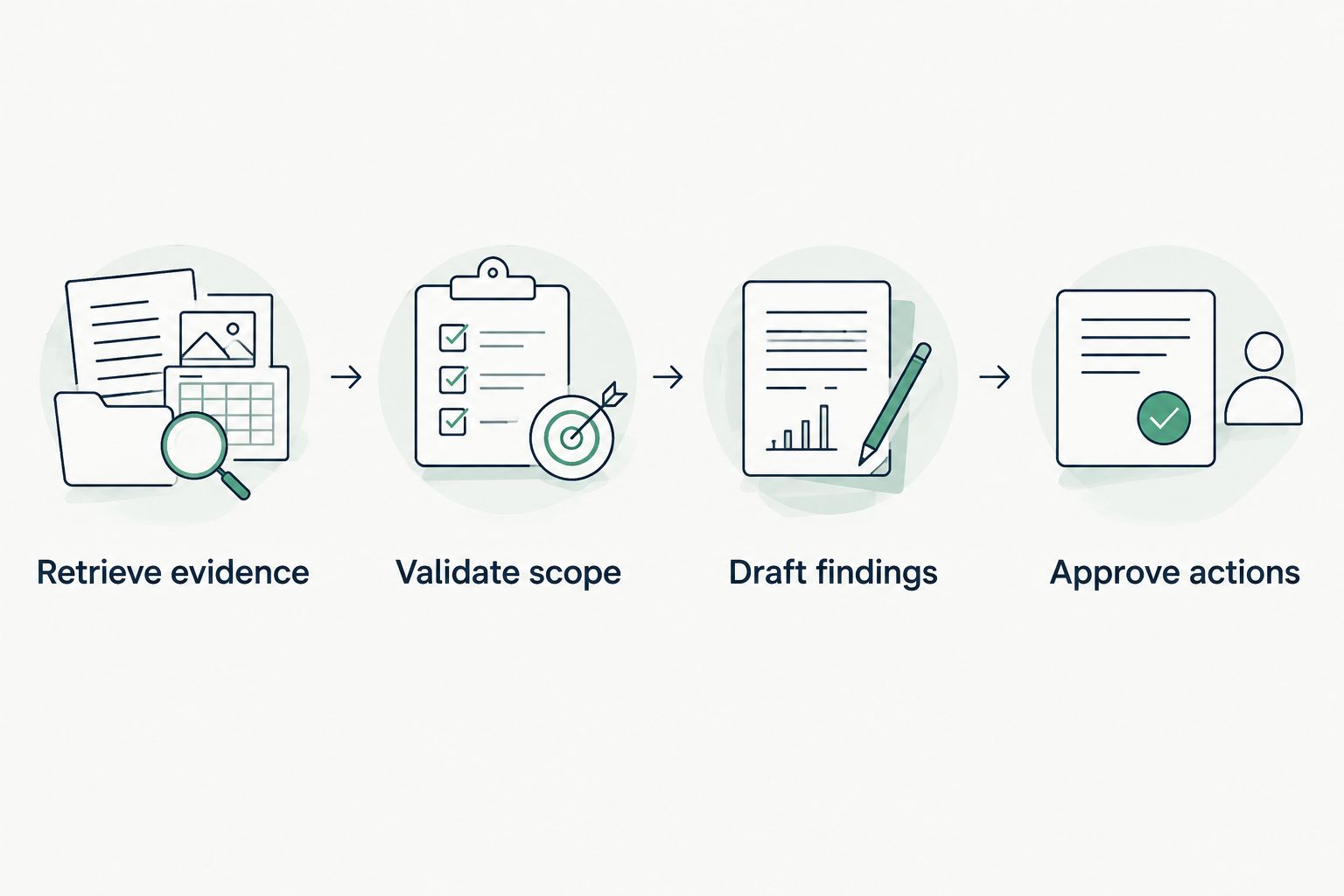
The working sequence is Retrieve evidence, Validate scope, Draft findings and Approve actions. Validation sits before drafting so an attractive summary cannot hide a wrong workspace or mismatched period.
Whenever new observations are recorded
A second workflow is recurring change analysis. Use it only after the read-only workflow passes acceptance testing and the authorised interface supports identifying newly recorded observations.
The distinction matters: an agent request to retrieve data is not automatically an event subscription. MCP tool access alone does not establish a scheduler, webhook or collection-completion trigger.
- Choose the orchestration mechanism. Use a documented event mechanism where one exists, or configure an external scheduler against the approved interface. Do not describe scheduled retrieval as real-time monitoring.
- Track processed observations. Keep a durable record of the observations already included in a brief. Use documented identifiers where available; otherwise define an explicit deduplication method with the data owner.
- Wait for complete retrieval. Process all required result pages before calculating changes. Flag an incomplete collection instead of comparing it with a complete earlier period.
- Generate a change brief. Include newly observed gaps, the evidence behind each change and a review owner. Do not resend an unchanged finding simply because the scheduler ran again.
- Route for approval. Send the draft to an authorised review destination through a separately approved integration. Keep external delivery credentials separate from data-reading credentials.
Expected result: each completed retrieval produces a traceable update without repeatedly processing the same observations.
In a 2026 reporting workflow, keep the collection timestamp distinct from the automation run time. A brief generated today can still describe older observations.
Troubleshooting
The host connects, but exposes no tools
Confirm that the server actually declares tool support and that the authenticated identity has access to the expected operations. MCP servers can expose capabilities other than tools; a connection is not proof that an analysis operation exists.
Authentication succeeds, but retrieval is denied
Check workspace membership, permission scope and the credentials used by the underlying adapter. Grant only the access required for the read operation; do not solve a scoped permission failure by granting blanket administrative access.
The agent reports no brand mentions from an empty response
Correct the response contract and analysis instruction. Return explicit completeness and empty-result information, then require the agent to distinguish no matching observations from observations in which the brand is absent.
Comparison results change unexpectedly
Inspect prompt membership, platform coverage, market, language and observation periods before interpreting the movement. Also verify pagination and filtering; an incomplete retrieval can change a denominator without reflecting any change in answers.
Answer text redirects the agent's behaviour
Treat retrieved answers and cited pages as untrusted data, not instructions. Keep tool permissions narrow, reject requests to reveal credentials and require approval for external actions; source text must not redefine the agent's operating rules.
Customise your workflow
Extend Koalr AI visibility analysis only after the evidence contract works. Add segmentation by product line, market or buyer intent when those dimensions exist in the authorised data; do not infer them from a brand mention alone.
Assign a marketing owner to the findings and a technical owner to the connector. The marketing owner checks whether a recommendation answers a real buyer question. The technical owner checks access, retrieval completeness and failure handling.
For your 2026 rollout, change one workflow dimension at a time. Adding platforms, prompts and delivery destinations together makes it harder to identify why a previously reliable brief stopped matching its evidence.
FAQ
What is Koalr MCP integration?
Koalr MCP integration is a workflow design for giving an MCP-capable agent authorised access to AI visibility evidence. Implement it through a verified supported server or a custom adapter backed by a documented data interface; do not assume a native connector exists.
Can I connect Koalr directly to any AI agent?
Direct connectivity depends on verified server support, host compatibility and authentication. Tracking answers from an AI platform does not establish that the platform can act as a host for the same MCP connection.
Do I need a developer for this workflow?
A custom MCP adapter requires engineering implementation and maintenance. If a documented connector is supplied, follow its supported setup; without a verified access route, use a clearly labelled manual evidence handoff.
Does an MCP connection collect fresh AI answers?
Not by itself: MCP provides communication between a host and a server. New measurement requires an explicitly supported operation or a separate collection process; reading stored observations does not refresh them.
Should my agent get permission to edit content?
Start with read-only analysis and require human approval for content changes. Separate evidence retrieval from publishing so an analysis error cannot immediately change public material.
How do I know the integration is working?
Check an authorised retrieval, an out-of-scope request and an empty-result query against their expected outcomes. Then verify that the agent's findings preserve observation references, scope and completeness.
Can the agent calculate Share of Voice?
Only calculate Share of Voice when the metric definition, eligible observations and competitor scope are explicit. Preserve the supplied definition rather than asking the agent to choose an undocumented denominator.
One last thing
A successful tool call can still produce a wrong marketing conclusion. The connection can work while the agent compares different prompt sets, reads an incomplete result or mistakes a citation for a recommendation.
Make evidence preservation your release criterion. Before expanding the workflow, ask a reviewer to reconstruct a finding from its attached observations without relying on the agent's explanation.