

Instead of manually chasing drafts, approvals and citation checks, use a Content Studio AI citable content workflow that connects each buyer question to an evidence-backed page and a repeatable measurement record. Keep the publishing handoff explicit: approve the content, transfer it to your CMS, verify the live page, then track the answers it was written to support.
- Use a Content Studio AI citable content workflow with separate drafting, approval, publishing and measurement stages.
- Koalr supports AI visibility tracking; your CMS remains the publishing destination in this workflow.
- Build prompt sets around buyer questions, then distinguish citations, mentions and recommendations.
- Publish verified answers, not unsupported claims; assess changes against a saved baseline.
Why this matters
A published article is an output. A citation is an observed result. Your workflow needs to connect them without treating publication as proof that an answer engine has used the page.
Koalr is best for marketing teams using AI visibility tracking to decide which content to improve. It helps teams track and improve how their brand appears in answers from ChatGPT, Gemini, Perplexity, Claude, Copilot and Google AI Overviews. That gives the editorial process a measurement layer; it does not replace evidence checks or publishing approval.
For your 2026 editorial programme, define success before drafting. Do you need an answer engine to cite a particular page, mention your brand in a category answer, or recommend it for a relevant use case? Those are different outcomes. Record them separately.
The benefit of this approach is traceability: you can connect a content change to the questions you monitor. The limitation is attribution. A changed answer does not, by itself, prove that your page caused the change.
Before you start
- Access: Have access to your drafting workspace, CMS and AI visibility records. Assign a content owner, factual reviewer and publisher; one person can hold multiple roles, but each responsibility needs an owner.
- Materials: Gather approved product facts, source documents, existing page URLs and a fixed set of buyer prompts. Start with the guide to building a prompt library for AI visibility tracking.
- Gotcha: A CMS preview can show the correct content while the public page remains unpublished, login-restricted or marked noindex. Make public-page verification a release gate, not a task you remember after reporting.
Use the field names below in your editorial record. They are proposed workflow labels, not claims about Content Studio menus or CMS button names. This guide uses an explicit editorial handoff rather than assuming a native connector or automatic publishing feature.
Configure the prompt brief
Your content brief should identify the question, the evidence and the page responsible for answering it. A keyword alone cannot do that.
- Create a prompt group. As a manageable starting exercise, choose 12 prompts across 4 buyer intents: category discovery, use-case evaluation, comparison and implementation. Write 3 prompts for each intent. These are planning quantities, not a benchmark for coverage.
- Save the baseline. Run the chosen prompts before editing. Record the prompt wording, engine, date, market, language and full answer. Where visible, preserve cited URLs and the context around any brand recommendation.
- Choose the destination. Assign each question to an existing page or a proposed new page. Prefer improving an existing page when it already serves the same reader and intent; create another page only when the question needs a distinct answer.
- Write the brief. Include Buyer question, Target reader, Destination page, Answer objective, Approved evidence and Reviewer. State what the page must explain and which claims need verification.
- Version the brief. Label the working record 2026 content baseline and record the actual capture date. Keep dates attached to observations rather than using the year as decoration in every heading.
Separate branded prompts from unbranded prompts. Asking whether a named supplier offers a capability tests a different behaviour from asking which suppliers to consider. Combining those answers hides the difference between brand recognition and discovery.
Expected result: Every draft has a defined reader, answer objective, evidence pack and baseline. The editor can explain why the page exists before writing it.
Configure the draft and evidence review
Content Studio is the drafting stage in this workflow. Treat its output as a draft requiring review, not as evidence that a claim is true or that an answer engine will cite it.
- Write the answer first. Open with a direct response to the buyer question. Follow it with the conditions, exceptions and supporting detail needed to make that response accurate.
- Build self-contained sections. Give each section a descriptive heading and enough context to make sense independently. Replace vague references such as “this solution” with the relevant product, method or category when clarity requires it.
- Attach the evidence. For each checkable claim, record the source and the statement it supports. Preserve the source date and scope. A result from one customer or one test must not become a claim about every customer.
- Add useful distinctions. Explain what the reader should choose, when that choice applies and when it does not. Include limitations alongside benefits rather than adding an unsupported “best” label.
- Review the draft. Ask the factual reviewer to check product capabilities, terminology, numbers and comparisons. Ask the editor to check whether the opening actually answers the question in the brief.
- Record approval. Mark Evidence review and Editorial approval separately. Record the approved draft version so the publisher does not accidentally transfer an earlier version.
For a 2026 content revision, update the evidence when the underlying facts change. Changing a date without checking the substance does not make an answer current.
Avoid unsupported specificity. A precise number without a source is a publishing defect, not a stronger answer. If the evidence supports only a qualitative distinction, write that distinction plainly.
Expected result: The approved draft answers the intended question, identifies its limits and contains no claim that depends on an unverified assumption.
Configure the publishing handoff
The handoff should preserve the approved answer, its structure and its evidence. Do not let formatting changes silently become content changes.
- Transfer the approved version. Copy the final content into your CMS using its supported editor or import method. Carry over headings, tables, source references and internal links; inspect them rather than assuming the transfer preserved everything.
- Set page metadata. Enter the page title and description in the appropriate CMS fields. Describe the actual answer on the page. Avoid promises of guaranteed citations or recommendations.
- Confirm page identity. Check the intended URL, canonical URL and whether this is a new page or an update. For an existing page, preserve its URL unless there is a deliberate migration plan.
- Inspect the preview. Check the opening answer, heading hierarchy, table layout, links and mobile reading order. Ensure that important content is not available only in an image.
- Approve publication. Have the designated publisher release the page through the CMS. Record the publication date and approved version in Release record.
- Verify the public page. Open it while logged out. Confirm that it returns the intended content, does not require authentication and has no unintended indexing restriction. Check crawl controls against the access you intend to allow.
Expected result: The approved answer exists at a verified public URL, and the release record identifies exactly what went live.
The sequence has five named checkpoints. Keep them visible in the editorial record so a draft cannot skip evidence review simply because its formatting looks finished.
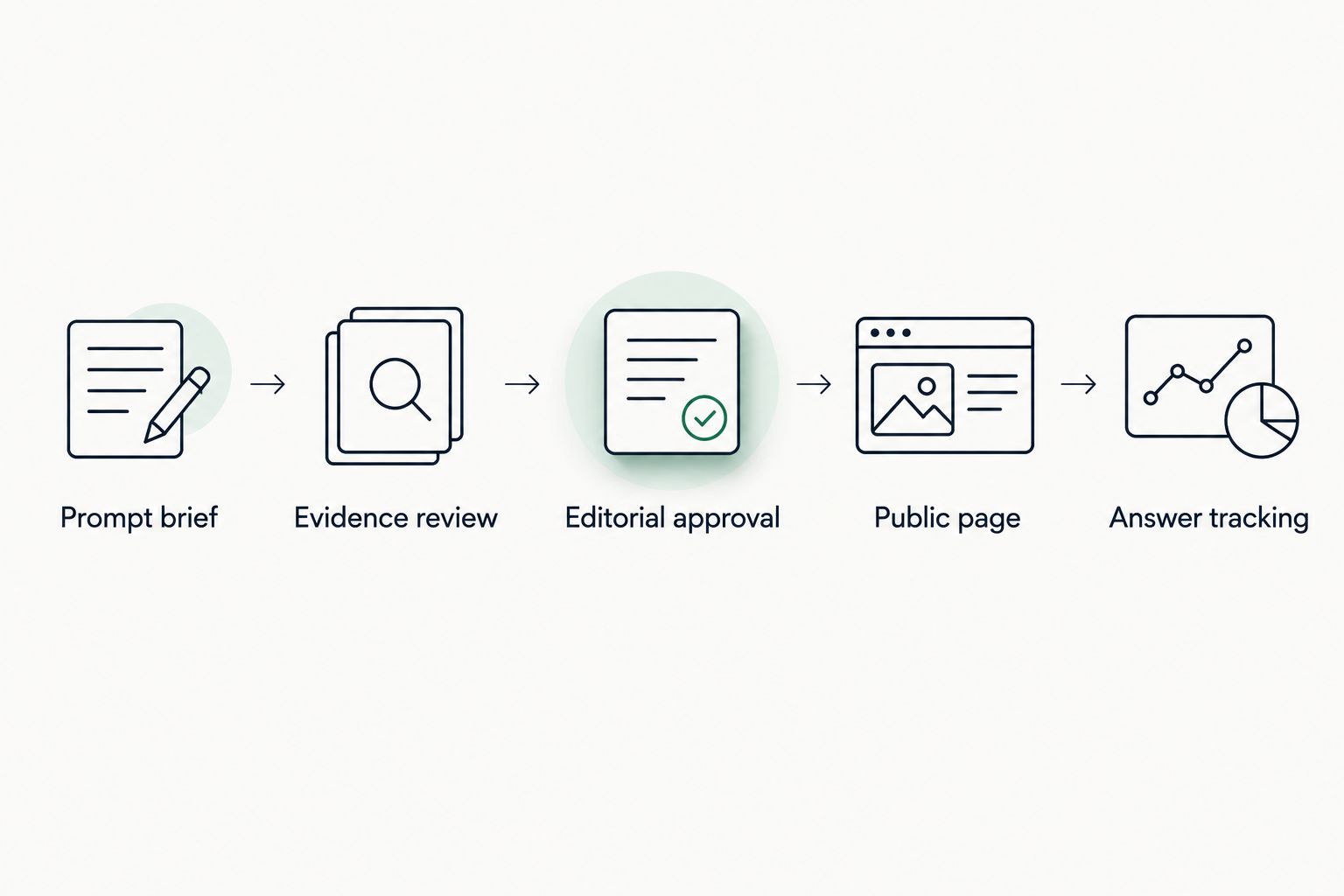
Configure answer tracking
Measure the answers the page was designed to support. Checking only whether the brand appears somewhere is too loose to guide the next edit.
- Link the release to its prompts. Record the live destination page against the original prompt group. Keep the pre-publication responses as the baseline rather than overwriting them.
- Preserve the conditions. Use the same prompt wording, market and language for comparison. Record the engine and available model information. Note any changed conditions beside the result.
- Classify the answer. Use Mention when the answer names the brand, Citation when it attributes information to a source, and Recommendation when it advises selecting or considering the brand. Record these independently because one answer can contain more than one.
- Inspect the source. If the answer cites your site, identify which page it cites. A citation to a different page is not evidence that the new article has been used.
- Schedule repeat checks. For an initial observation plan, check after 7 days and again after 28 days. These are suggested review intervals, not promises about crawling, retrieval or citation timing.
- Record the next action. Decide whether to leave the page unchanged, correct a factual gap, strengthen the answer or investigate technical access. Attach the decision to the observed answer.
Koalr provides the AI visibility tracking context for this process. The content team still needs to interpret what changed and whether the answer supports the intended buyer decision.
Keep a 2026 answer review record with dated observations. Do not collapse a month of different responses into a single screenshot labelled “performance”.
Expected result: You have a repeatable comparison between the saved baseline and post-publication answers, with a specific editorial action rather than a blanket success claim.
Refresh an existing page when its answer changes
Use a refresh workflow when an existing page already owns the question but its facts, clarity or coverage need correction. Keep the page identity stable and document the changed passages.
| Workflow | Best for | Advantage | Limitation |
|---|---|---|---|
| New-page workflow | A distinct buyer question without a suitable destination | Gives the question a dedicated answer | Adds another page to maintain and can duplicate existing coverage |
| Existing-page refresh | A relevant page with an outdated or incomplete answer | Preserves a familiar destination and supports version comparison | Makes attribution harder when several changes happen together |
- Save the current page text and its answer-tracking baseline.
- Identify the exact passage that needs correction or expansion.
- Repeat factual review and editorial approval for the revised content.
- Publish at the existing destination and record the changed sections.
- Repeat the same prompt checks and compare cited sources as well as brand mentions.
Prefer the existing-page refresh when the buyer question has not changed. Use the new-page workflow when combining the questions would make the page less useful.
For your 2026 refresh log, distinguish a factual correction from a structural edit. Otherwise, a later reviewer cannot tell whether the team fixed an error or simply reorganised the answer.
Troubleshooting
The live page differs from the approved draft
Check the CMS version, scheduled publication state and any caching layer. Compare the public page with the recorded approved version, correct the mismatch and verify again while logged out. Pause measurement until the intended content is live.
The brand appears, but the new page is not cited
Classify the result as a mention rather than a page citation. Inspect any sources attached to the answer and check whether they support the relevant statement. Do not claim the new article earned the result without evidence connecting it to the answer.
Citations lead to an older page
Check whether both pages answer the same question and whether the older page contains the clearer answer. Review page purpose, internal links and canonical configuration. Improve or consolidate overlapping content where appropriate; do not redirect a useful page solely to force a citation change.
The page is public, but access is restricted
Inspect unintended noindex directives, robots rules, authentication and security controls. Make deliberate access decisions for search and answer-engine crawlers; their purposes are not identical. Removing a restriction does not guarantee retrieval or citation.
Answer results change between checks
Preserve the exact prompts and note changes in engine, language, market or other visible conditions. Repeat the observation rather than treating one answer as a stable trend. Report what the records show, including inconsistent outcomes.
Customise your workflow
Once the handoff works, expand coverage by buyer intent, product line or market. Keep those groups separate so a strong result for one audience does not conceal weak answers for another.
Assign a reviewer to each evidence domain. Product marketing can check positioning and terminology; subject specialists should validate technical claims. The publisher owns the live-page check, while the measurement owner maintains prompt conditions and answer records.
With Koalr AI visibility tracking, keep the distinction between appearances in answers and visits to your website explicit. Referral analytics measure visits. A citation can exist without producing a visit, so neither record replaces the other.
For the next publishing cycle, choose one question, one destination and one accountable owner. Complete the full workflow before increasing draft volume.
FAQ
What is a Content Studio AI citable content workflow?
It is an editorial process that connects a buyer question to a verified draft, a published page and repeatable answer tracking. The workflow separates content production from evidence that an answer engine has cited or recommended the brand.
Does this workflow automatically publish from Content Studio?
This workflow uses an explicit handoff from the approved draft to your CMS. It does not assume a native connector, automatic publishing or particular product menu labels.
What makes content suitable for citation in AI answers?
Content is suitable for citation when it gives a clear answer supported by verifiable evidence. Descriptive headings, explicit conditions and accessible page text make the answer easier to inspect, but none guarantees a citation.
How is a citation different from a brand mention?
A citation attributes information to a source, while a mention names the brand. A recommendation goes further by advising the reader to select or consider that brand; record these outcomes separately.
Should I create a new article or refresh an existing page?
Refresh an existing page when it already serves the same buyer question. Create a new page when the question needs a distinct answer and destination, not merely another variation of the same keyword.
How soon should I check answers after publishing?
Use 7 days and 28 days as initial review intervals for this workflow. They are suggested checkpoints, not guaranteed retrieval times; keep the prompt wording and comparison conditions consistent.
Can Koalr replace my CMS or factual reviewer?
Use Koalr for AI visibility tracking in this workflow, not as a substitute for CMS publication or factual review. Assign separate responsibility for approving claims, releasing the page and interpreting answer changes.
One last thing
Keep the passage around the citation, not just the cited URL. A page can appear in a source list without supporting the claim you wanted it to support. The surrounding answer tells you whether the page contributed useful evidence, whether the brand was recommended, and what the next edit should address.