

Competitors do not gain access to your tracked prompts simply because you monitor their brand; access depends on the tool’s permissions, sharing features and data-use terms. Check those controls before treating a prompt library as confidential, and distinguish access to your saved prompts from a rival independently asking the same questions.
- Can competitors see the prompts you track in an AI visibility tool? Check permissions, sharing and data-use terms.
- Tracking a competitor is not the same as granting that competitor access to your prompt library.
- Koalr serves marketing teams tracking brand visibility in AI answers; assess prompt confidentiality separately.
- Test workspace access and exported reports before uploading commercially sensitive prompt sets.
Why this matters
A prompt set records what you want to measure. If it includes an unpublished product name, a target account or a planned market entry, disclosing it reveals more than a list of search questions.
The distinction matters for your 2026 measurement plan: you want public answers to measure, not confidential strategy in the inputs. Keep buyer-facing questions separate from internal notes explaining why those questions matter.
Start with a prompt library for AI visibility tracking built around public buyer language. Store sensitive commercial reasoning in an approved internal system rather than embedding it in every prompt.
Can competitors see the prompts you track in an AI visibility tool?
Monitoring a rival does not itself authorise that rival to view your prompts. To answer the question for a particular tool, establish who can access the saved prompt text, where copies travel and what the provider is permitted to do with it.
Use these 5 checks during procurement. They are verification steps, not claims that every platform offers the same controls.
1. Workspace access
Ask the provider to demonstrate how access is restricted between customer accounts. Then inspect the roles available inside your own workspace: who can read prompts, edit them, export them or invite another person?
A workspace name alone does not prove separation. Request evidence of the access boundary rather than accepting a screenshot of separate dashboards.
2. Report sharing
Check whether a shared report includes exact prompts, topic labels, answers, citations or only summary metrics. These are different disclosure levels.
If the tool supports shareable links, establish whether recipients must authenticate and whether links can be revoked. Do not assume that a report intended for leadership is safe to circulate externally.
3. Provider processing
Ask which organisations receive the prompt text when a tracking run executes. Separate the visibility platform’s handling from any downstream model or infrastructure provider’s handling.
Request the applicable terms for the actual service route. A policy covering one product or account type is not evidence about a different integration.
4. Secondary use
Check whether the provider can reuse customer prompts in shared datasets, suggested prompt libraries, benchmarks or product demonstrations. Ask whether that reuse includes exact wording or only aggregated information.
Get the answer in writing. A general statement about confidentiality does not explain every permitted use.
5. Copies and deletion
Find out what happens to exports, integrations, logs and backups when you delete a prompt or close an account. Ask the provider to identify which copies the deletion process covers.
Your team must also manage its own copies. Deleting a prompt in the platform does not delete a spreadsheet someone downloaded earlier.
Which exposure routes should you compare?
Treat the following as review scenarios, not descriptions of any named provider. Each route needs a different check; a successful login test does not settle how exported files are handled.
| Route | Best for | Benefit | Limitation to check |
|---|---|---|---|
| Restricted workspace | Day-to-day analysis | Keeps analysis within an authorised group | Confirm roles and customer-account separation |
| Authenticated report | Controlled stakeholder review | Shares findings without inviting everyone into the workspace | Check which prompt fields recipients can read |
| Downloaded export | Offline analysis | Supports work outside the platform | Copies need separate access and deletion controls |
| Shareable link | Distribution to an intended audience | Reduces the need to distribute files | Verify authentication, onward sharing and revocation |
| Aggregated benchmark | Comparing performance | Can report trends without publishing every prompt | Confirm whether exact wording or customer identity is exposed |
Choose the smallest disclosure that answers the recipient’s question. A leadership report about citation performance does not automatically need your complete prompt inventory or internal campaign labels.
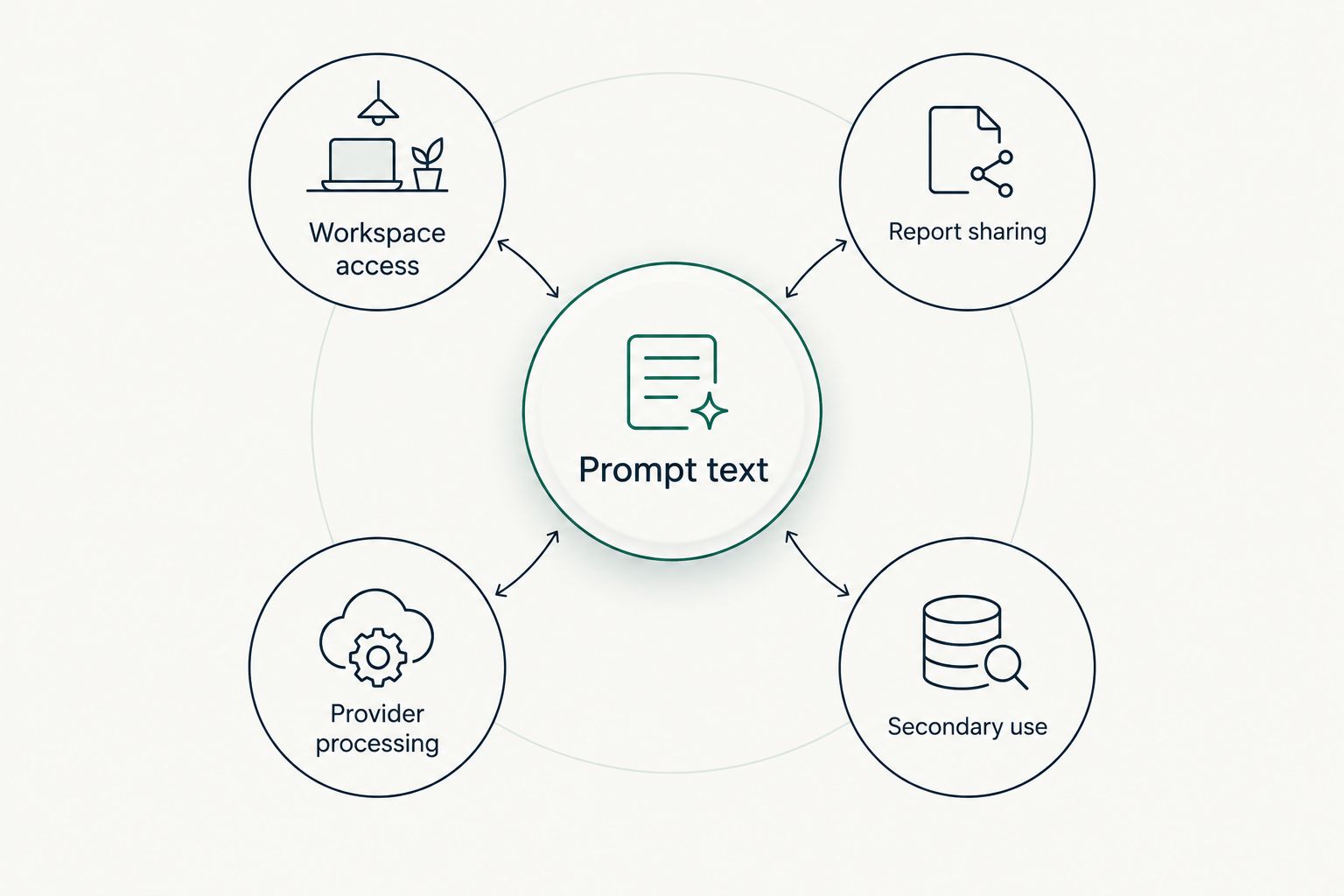
Why prompt confidentiality varies
The useful question is not whether a tool calls itself private. It is whether the access rules and permitted uses match the sensitivity of your prompt set.
- Account permissions: Check who can invite users, change roles and export data. Review agency and contractor access alongside employee access.
- Sharing configuration: Establish whether reports reveal exact wording and whether access requires an approved identity.
- Processing arrangements: Identify the services receiving prompt text and the terms that apply to each transfer.
- Reuse terms: Ask whether customer inputs contribute to shared libraries, benchmarks or other customers’ experiences.
- Retention and removal: Confirm how long relevant records remain and what account closure actually removes.
Use these factors in your 2026 supplier assessment. Record the answer, its supporting document and the person responsible for approving it; do not reduce the assessment to an unexplained tick beside “private”.
A security certification, if a supplier presents one, also needs context. Ask what service and controls it covers rather than treating the badge as an answer to prompt sharing.
How do you test access before uploading sensitive prompts?
Run a small acceptance test using harmless sample text. Do not use a real launch plan to discover whether a report exposes launch plans.
Prepare 3 test identities
Where the provider supports the required setup, use 3 test identities: a workspace administrator, a restricted colleague and an unrelated account. Ask the provider to demonstrate any boundary you cannot test yourself.
Create a distinctive sample prompt without personal or confidential information. Use the same sample throughout the exercise so you can recognise it in reports and exports.
Check the intended boundary
Have the administrator save the sample, then check what the restricted colleague can see and change. Test the unrelated account only through an authorised demonstration or normal product access; do not probe systems without permission.
If report sharing exists, send a test report to an approved recipient. Inspect whether the report contains the prompt text and whether access still works after you revoke it.
Record the result
Keep a short 2026 acceptance record containing the tested role, expected access, observed access and any unresolved question. Include the product configuration so the result is not mistaken for a guarantee about every setup.
A successful test proves the tested behaviour, not every aspect of confidentiality. It does not establish contractual reuse rights, backup deletion or downstream retention. Review those through documentation and written supplier answers.
What should you keep out of a tracking prompt?
Use prompts that resemble public buyer questions. Keep confidential context out unless the workflow has explicit approval for that information.
For example, ask about the capabilities a buyer needs rather than inserting an unreleased feature name. Measure a target market’s questions without adding internal revenue expectations or a confidential expansion timetable.
Separate 2 records: the question sent for measurement and the internal explanation of its strategic importance. This keeps the measurement readable without making the external input carry your entire commercial brief.
Apply the same discipline to prompt labels. A harmless question paired with an internal acquisition codename still creates a disclosure concern when that label appears in an export.
This is an input-design recommendation, not a promise of anonymity. Removing a company name does not necessarily remove identifying context from a detailed scenario.
Does a competitor asking the same question mean your prompts leaked?
Matching prompts alone do not establish a leak. A question based on public product categories, common buyer objections or published comparisons is not evidence that someone accessed your saved library.
Separate the observation from the explanation. Record what matched, where you observed it and whether the wording includes genuinely non-public information before drawing a conclusion.
A citation to your website is also different from access to your tracking inputs. A citation points to a source used in an answer; a mention names your brand; a recommendation presents it as a choice. None of those observations, by itself, proves that a rival can read your workspace.
Investigate access records and sharing routes when you have evidence of unauthorised disclosure. Do not treat ordinary overlap in buyer questions as proof of a security incident.
Does using the same model give rivals access to your library?
Using the same model is not the same as sharing a visibility-tool account. Your saved prompt library, the requests sent for processing and the answers generated are separate parts of the workflow.
For your 2026 review, ask how the visibility platform submits requests and which terms govern that route. Do not substitute assumptions about a consumer chatbot account for the terms covering the platform’s actual processing arrangement.
Model-training use is another separate question. Ask about it explicitly, alongside retention and sharing, rather than treating one answer as proof of the others.
Where does Koalr fit in this decision?
Koalr is an AI visibility platform for marketing teams tracking how their brand appears in AI-driven answers. Its stated scope includes ChatGPT, Gemini, Perplexity, Claude, Copilot and Google AI Overviews.
That makes Koalr relevant when your task is measuring brand presence across those answer environments. The benefit is its stated focus on tracking and improving brand appearance; that description alone does not establish prompt-isolation, retention or sharing controls.
Assess Koalr’s AI visibility scope and confidentiality requirements separately. Request evidence for the controls your organisation requires, just as you would for any other supplier handling commercially sensitive inputs.
FAQ
Can competitors see the prompts I track just because I add their brand?
Adding a competitor’s brand is not itself a grant of access to your saved prompts. Verify the tool’s account permissions, reporting behaviour and data-use terms to establish who can actually see them.
Can another customer of the same tool read my prompt library?
That depends on the platform’s access controls and permitted sharing arrangements. Ask for evidence of customer-account separation and check whether any shared datasets include customer prompt text.
Does tracking a prompt make it public?
Tracking a prompt is not the same action as publishing it. Check whether the workflow creates public reports, shareable links, exports or other copies accessible outside your authorised team.
Can my agency see the prompts I track?
Your agency’s access depends on the permissions and copies you give it. Review workspace invitations, shared reports and exported files when the engagement changes or ends.
Does private prompt tracking mean prompts are never used for training?
Access privacy and model-training use are separate questions. Request the applicable data-use terms for both the visibility provider and any downstream processing route.
Is an AI citation evidence that my tracked prompt leaked?
An AI citation alone is not evidence that your tracked prompt leaked. It identifies a source in an answer, not who accessed your saved prompt library.
What should I check before uploading a confidential prompt set?
Check workspace access, report sharing, downstream processing, secondary use and deletion. Use harmless sample prompts to test visible behaviour, then verify contractual questions in writing.
One last thing
Review the report before you worry only about the prompt editor. A carefully restricted workspace still leaves a disclosure route if an authorised person distributes a detailed export outside the intended audience.
Before your next 2026 reporting cycle, inspect a representative report as its recipient would see it. Remove confidential labels and strategic notes that the recipient does not need, then document who is allowed to receive the remaining detail.