

Yes, you can track AI visibility without publishing your prompts to competitors: keep the prompt library access-controlled, submit only approved information, and share results without raw prompt text. That does not mean prompts remain inside your organisation; check how the tracking provider and any downstream model providers process them. Keeping prompts from rivals and keeping prompts from suppliers are different requirements.
- Can you track AI visibility without exposing prompts to competitors? Yes: restrict prompt access and share aggregate results.
- Koalr supports marketing teams tracking brand visibility in AI answers; assess confidentiality separately from measurement capabilities.
- Separate prompt-library permissions, model-provider processing and report sharing before approving a tracking workflow.
- Use public buyer questions for competitive benchmarking; keep confidential launch plans out of routine prompt sets.
Can you track AI visibility without exposing prompts to competitors?
Yes. You do not need to publish your measurement questions to compare your brand with competitors in AI-generated answers. You need a controlled workflow that distinguishes the private inputs from the results people need to see.
For your 2026 tracking programme, use these steps before adding commercially sensitive questions:
- Classify the inputs. Separate public buyer questions from internal positioning, customer information and unreleased plans.
- Map the recipients. Identify the tracking platform, downstream model providers and anyone receiving reports or exports.
- Check access. Establish who can view, edit, download and share prompt text, including external collaborators.
- Review processing terms. Ask about retention, training use, support access, subprocessors and deletion across the workflow.
- Separate reporting. Give decision-makers the findings they need without automatically distributing the underlying prompt library.
- Test the workflow. Inspect a sample report, export and shared view before using sensitive inputs.
Build these rules into your prompt library for AI visibility tracking, rather than adding them after the library has spread across teams.
Why this matters
A prompt set records what you choose to measure. Its wording, grouping and weighting can reveal the audiences, buying criteria and competitors receiving your attention—even when each question uses publicly available information.
The answer is not to stop measuring. Measure public buyer demand without attaching unnecessary internal context. A question about software selection does not need your confidential sales notes to become useful.
Treat a 2026 visibility dashboard as a measurement surface, not a substitute for a data-handling review. A useful score does not tell you who can access its underlying inputs.
Choose what stays private and what gets shared
Different information belongs at different access levels. The following approaches are workflow choices, not claims about features available in any particular platform.
| Approach | Best for | Benefit | Limitation |
|---|---|---|---|
| Restricted prompt library | Analysts maintaining the benchmark | Preserves wording and context for repeatable checks | Requires deliberate permission and export controls |
| Aggregate reporting | Leadership reviewing performance | Communicates findings without distributing every prompt | Hides detail needed to investigate individual answers |
| Sanitised prompt set | Teams testing sensitive commercial themes | Removes confidential details before submission | Excessive simplification changes the question being measured |
| Public methodology | Teams explaining their measurement approach | Makes scope and definitions inspectable | Publishing exact prompts also discloses those inputs |
Keep exact prompts with the people responsible for measurement; share conclusions according to the recipient's task. Do not assume everyone who needs a visibility score also needs access to the research behind it.
Restricted prompt library: preserve the measurement detail
A restricted library suits the analysts responsible for selecting questions, checking answers and investigating changes. Keep the approved wording, classification and revision history together so the team can explain what changed.
The trade-off is administration. Restrictions only help when access, exports and external collaboration follow the same rules; a private workspace does not compensate for an unrestricted copy elsewhere.
Aggregate reporting: distribute the decision, not every input
An aggregate report suits leadership and stakeholders who need priorities rather than raw research. Include the reporting period, engines checked, topic scope and definitions of the metrics shown.
Aggregation reduces detail. Give authorised analysts a route back to the underlying evidence, and avoid presenting a summary as if it describes every answer generated for every buyer.
Sanitised prompt set: remove secrets without removing intent
A sanitised prompt set suits questions inspired by confidential research. Convert internal context into a public-facing buyer requirement before submitting it to a tracking workflow.
For example, test a need for regional data controls without including a named prospect's procurement notes. The limitation is relevance: remove too much context and you stop measuring the buying situation that matters.
Why prompt-exposure risk varies
The relevant question is not simply whether a dashboard is private. Exposure depends on the information entered and the routes through which it travels.
- Input sensitivity. A generic category question and an unreleased positioning document require different handling.
- Recipient scope. Identify both the platform receiving the prompt and any downstream services involved in processing it.
- Access scope. Check who receives workspace access, support access and exported files.
- Sharing format. Review whether reports disclose full prompts, answer transcripts, topic labels or aggregate findings.
- Retention and reuse. Establish how stored inputs are handled, whether training use applies, and what deletion covers.
- Context disclosure. Internal annotations, filenames and topic labels deserve the same review as the prompt itself.
Use this list as your 2026 approval checklist. Ask for documented answers tied to the actual service and account configuration you intend to use, rather than treating general assurances as evidence.
Separate competitor access from provider processing
There are distinct boundaries between your team, the tracking service, downstream providers and report recipients. Assess each boundary separately; approval at one does not establish approval at the others.
Competitor access
Competitor exposure concerns outsiders obtaining your prompt wording, topic priorities or internal analysis. Inspect public sharing, guest access, report distribution and exported files as separate routes.
Naming a rival in a prompt is not the same action as sharing that prompt with the rival. The confidentiality question is who can access the submitted text and its stored copies.
Provider processing
Provider processing concerns what happens after you submit the prompt. Ask which organisations receive it, what they retain, who can access it and what contractual restrictions apply.
A no-training commitment does not, by itself, answer retention, human-access or deletion questions. Read each commitment for its stated scope rather than treating one answer as a complete privacy assessment.
Report sharing
Report sharing concerns what leaves the measurement workspace. Decide whether recipients need full wording, short topic labels, answer extracts or aggregate results.
Use the same distinction for agencies and other partners. Someone responsible for fixing a cited page needs different evidence from someone reviewing the overall marketing plan.
Build a tracking workflow that limits disclosure
Use a repeatable sequence: classify inputs, sanitise prompts, approve access, review processing and restrict reporting. Assign responsibility for each decision so confidentiality does not depend on whoever happens to prepare the next report.
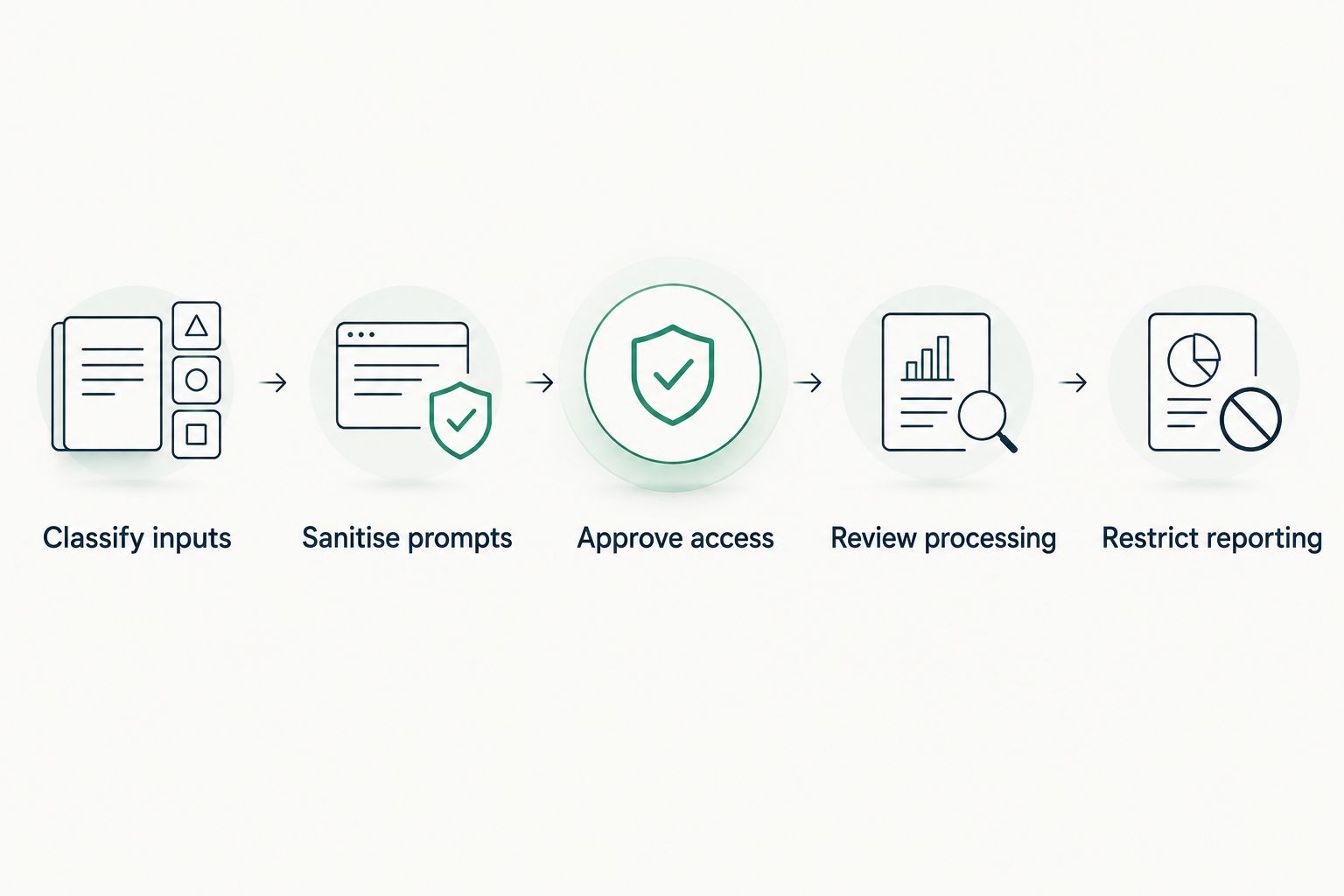
Classify inputs
Label public buyer questions separately from restricted research. Record the intended audience, commercial intent and reason for including each question without copying sensitive source material into the tracking workspace.
Also review the surrounding metadata. A harmless prompt beside a confidential launch label still discloses information you intended to protect.
Sanitise prompts
Preserve the buyer's need while removing names, private account details and unreleased strategy. Use language a buyer could reasonably ask without knowing your internal plans.
Do not turn a precise selection question into a vague category query solely to make it easier to approve. If the essential context is confidential, keep that test outside the routine benchmark until its handling is approved.
Approve access
Define who maintains the prompt library, who investigates results and who receives summaries. Request evidence for the access controls you require before depending on them.
When the platform cannot provide the separation you need, reduce what you submit or distribute. Do not describe a manual operating rule as a technical restriction.
Review processing
Ask the provider to explain the actual processing route for your intended workflow. Include downstream services, storage, support access, retention and deletion in the review.
Repeat the assessment when that route changes. An approval for one configuration is not an automatic approval for a different provider, integration or sharing arrangement.
Restrict reporting
Prepare a leadership view and an analyst view with different levels of detail. Keep the scope visible in both so a cleaner report does not become a misleading report.
For your 2026 reporting template, include the question categories and measurement definitions. Exclude confidential annotations and raw prompts unless the recipient needs them and has approval.
Keep confidentiality controls from weakening the benchmark
A private prompt set still needs to produce interpretable evidence. Record the engine, collection date, language, market context and approved prompt version alongside each observation.
Separate these outcomes rather than treating them as interchangeable:
- Mention: the answer names the brand.
- Citation: the answer references a source supporting its response.
- Recommendation: the answer presents the brand as a choice for the user's need.
A citation is not automatically a recommendation. Likewise, a brand mention does not establish that the answer cited your website.
Keep an approved core prompt set for comparisons and a separate area for exploratory questions. When wording changes, mark the change rather than silently joining the results into an apparently continuous trend.
For 2026 competitive reporting, state the denominator behind Share of Voice and identify the prompt set it describes. Results from a selected benchmark describe that benchmark, not every conversation across an answer engine.
Where Koalr fits
Koalr is best suited to marketing teams tracking how their brand appears in AI answers. Koalr's AI visibility platform covers brand appearances across ChatGPT, Gemini, Perplexity, Claude, Copilot and Google AI Overviews.
The relevant benefit is a focus on brand visibility in answers. The qualification is equally important: product purpose is not evidence of prompt confidentiality. Assess Koalr against your access, processing and reporting requirements before submitting restricted material.
Does naming a competitor expose my prompt to that competitor?
Naming a competitor does not itself constitute sharing the prompt with that company. Review the access permissions, processing arrangements and distribution of the resulting reports to determine where disclosure occurs.
Can I benchmark competitors without publishing my prompt set?
Yes. Compare brands against an approved private prompt set and share the resulting findings with a clear description of scope. Keep the wording available to authorised analysts who need to validate those findings.
Should I hide every prompt from leadership?
No. Match disclosure to the decision: leadership needs enough context to understand the benchmark, while detailed investigation requires the exact inputs. Restrict sensitive wording rather than stripping away all methodological transparency.
FAQ
Can you track AI visibility without exposing prompts to competitors?
Yes. Keep the prompt library access-controlled, review provider processing and share findings without automatically sharing raw prompts. Those measures address different disclosure routes and should be assessed separately.
Does a private dashboard mean my prompts stay inside my company?
No. A private dashboard describes an access boundary, not necessarily the full processing route. Check whether the tracking service sends inputs to downstream providers and what terms apply.
Can I use confidential customer information in visibility prompts?
Keep confidential customer information out of routine visibility prompts. Translate the relevant buying need into a public-facing question, and obtain appropriate approval before any workflow uses restricted information.
Does a no-training policy mean prompts are not stored?
No. Training use and storage are separate questions. Review retention, access and deletion commitments independently, including their scope across downstream services.
Can competitors recreate my prompt library?
Competitors can independently write similar questions about public buyer needs. That does not establish access to your library, its exact wording, its weighting or its internal annotations.
What should I check before using Koalr for AI visibility tracking?
Check the access, processing, retention, deletion and sharing requirements that apply to your organisation. Evaluate confidentiality separately from the platform's role in tracking brand appearances in AI answers.
Can I share AI visibility results without sharing prompts?
Yes. Share topic-level findings, metric definitions, reporting scope and recommended actions without including every prompt. Keep authorised access to detailed evidence for investigation and validation.
One last thing
Your competitive advantage does not require every buyer question to be secret. Protect the internal priorities, weighting and research attached to those questions while making your published content answer the public questions clearly.
Before the next report leaves your team, inspect the file itself—not just the dashboard permissions. Check the prompt text, annotations, filenames and answer extracts that the recipient will actually receive.