

Childcare centres’ answer engine optimization is the practice of making your nursery’s verified information easy for answer engines to find, interpret and cite, with the aim of earning relevant parent enquiries. This 2026 guide explains how to measure recommendations, correct misleading answers and publish location-specific information without exposing children’s personal details.
- Answer engine optimization for childcare centres starts with accurate location pages, not generic nursery articles.
- Separate brand mentions, source citations and recommendations when testing ChatGPT and Google AI Overviews.
- Build parent-focused prompt sets around location, age groups, care arrangements and practical questions.
- Fix incorrect childcare information before chasing more citations or a higher Share of Voice.
Why answer engine optimization matters for childcare centres
A childcare recommendation needs more than a business name. Parents need to establish whether a setting fits their location, their child’s age and their care arrangements. Your content should let them verify those details rather than infer them from promotional copy.
Being named is not the same as being recommended, and being recommended is not proof that the answer is accurate. An answer can name the right nursery while describing the wrong branch. That makes accuracy a separate measurement requirement, not a footnote to visibility.
Start with a prompt library for AI visibility tracking that reflects real questions your team receives. Use enquiry records and conversations with parents, stripped of personal information, rather than treating invented search demand as evidence.
For your 2026 baseline, measure what appears in answers and what happens after a visit separately. Referral analytics cannot describe an answer that never sends someone to your website. Equally, a citation alone does not establish that a parent contacted your centre.
Build your childcare answer engine optimization workflow
Establish a verified fact sheet for each centre
Start manually with a shared document. Give each location its own record and nominate someone who can approve operational details. A marketing writer should not decide which age groups a nursery accepts or describe support arrangements without confirmation from the centre.
Record the source and review date for each fact. If the centre manager changes a detail, update the website and relevant public listings from that approved record. This prevents different teams from publishing conflicting descriptions.
Keep the boundary clear between factual information and individual advice. A general explanation of your settling-in process is publishable; an identifiable account of a child’s experience is not needed to answer a parent’s question. Use approved, general descriptions instead.
Your fact sheet is the basis for correcting an answer, not just writing a page. Without it, you cannot reliably decide whether a recommendation describes your setting correctly.
- Confirm the official centre name, address and contact details.
- Record accepted age groups and care arrangements exactly as approved.
- Document admissions and visit-request processes without promising an outcome.
- Verify inspection information against the relevant official record.
- Assign an owner and review date to each operational detail.
Build prompt sets around parent decisions
Write questions manually before choosing tracking software. Separate discovery questions from branded verification questions: asking which nurseries suit a particular area is a different test from asking whether your named centre accepts a particular age group.
For a manageable starter exercise, choose 20 prompts per location. This is a suggested workload, not a demand estimate or performance benchmark. Include location discovery, suitability, practical arrangements and branded fact-checking rather than filling the set with variations of your name.
Use explicit neighbourhoods or towns instead of relying exclusively on “near me”. Record the intended location and language alongside each prompt. Keep a stable core set for comparison, then maintain a separate exploratory set for new questions.
Build your 2026 prompt set from recurring parent questions, but remove names, health information and other identifying details. Do not copy private enquiries verbatim into an external service.
- Test nursery discovery within a named town or neighbourhood.
- Ask about suitability for an approved age group.
- Include questions about verified care arrangements.
- Test branded questions for each individual branch.
- Record prompt wording, intended location and parent intent.
Measure mentions, citations and recommendations separately
The manual route is straightforward: run the prompts, save the answers and classify what happened in a spreadsheet. Record the platform, date, wording and any visible sources. Capture enough evidence to let another person check your classification.
Use three distinct labels. A mention names your centre. A citation identifies a source supporting the answer. A recommendation presents your centre as a choice for the parent’s stated requirements. One response can contain all three, but none should automatically stand in for another.
Koalr is best for marketing teams that need to track their brand’s visibility across AI-driven answers. Koalr’s answer engine optimization software supports tracking and improving brand appearances across ChatGPT, Gemini, Perplexity, Claude, Copilot and Google AI Overviews. It does not replace centre-level verification of childcare information.
For an initial manual check, repeat important prompts in 3 separate runs and preserve each result. That is a testing recommendation, not a claim about how often answers change.
- Classify mentions, citations and recommendations independently.
- Record whether the answer identifies the correct location.
- Flag incorrect facts even when the recommendation is positive.
- Preserve cited source addresses in your evidence log.
- Keep platform results separate before creating a combined summary.
Publish pages that resolve location-specific questions
Review your existing pages manually before commissioning new articles. A parent should be able to identify the centre, understand the verified care arrangements and find the next step without piecing information together across unrelated pages.
Give each location a distinct factual page. Start with a direct description, then organise the content around practical questions. Use headings such as age groups, care arrangements, settling in and requesting a visit only where you have approved information to publish.
Write each answer so it makes sense on its own. Replace “we offer this at both sites” with the relevant centre name and the specific arrangement. Avoid unsupported terms such as “best nursery” or “safest setting”; explain your documented processes instead.
Use your 2026 review to check whether inspection references remain current. Identify the relevant UK jurisdiction rather than treating one inspection system as applicable everywhere. Structured data should match visible content and should never be presented as a guarantee of citation.
- Put the centre name and locality in the opening description.
- Publish approved facts in readable text, not only images.
- Give practical questions direct, self-contained answers.
- Attribute inspection information to the appropriate official record.
- Match any structured data to the page’s visible facts.
Correct conflicting information beyond your website
Start with the sources visible in your saved answers. Compare each source with the verified centre fact sheet, then identify whether your team controls it. Fix your own content first; request corrections from third parties where you have evidence of an error.
Prioritise identity problems. Similar centre names, old addresses and group-level descriptions create ambiguity for anyone researching a particular branch. Do not assume that publishing another blog post will resolve an incorrect external listing.
Keep a correction log with the disputed fact, supporting evidence, owner and status. Once a source has changed, retest the relevant prompt and preserve the new answer. A source correction is not proof that every answer engine has incorporated it.
This work is about making public information consistent, not manufacturing praise. Ask for genuine reviews through your normal process without scripting claims or including identifiable information about children.
- Check the public sources cited in your baseline answers.
- Correct inconsistent names, addresses and branch descriptions.
- Remove outdated claims from pages your team controls.
- Submit evidence-based correction requests to external publishers.
- Retest affected prompts after confirmed source updates.
Connect visibility findings to parent enquiries
Use a spreadsheet and your existing enquiry process first. Record website visits attributed to identifiable answer-engine referrals separately from the answers captured in your tests. These are different observations: one concerns exposure in an answer, the other concerns a visit.
Add an optional enquiry question asking how the parent found your centre. Treat the response as self-reported attribution, not a complete record of their research. A parent can encounter several sources before contacting you.
Keep location-level reporting intact. A group-wide visibility summary can conceal a branch whose facts are wrong or whose discovery prompts never produce a relevant recommendation. Report the parent intent as well as the location so your next content task has a clear purpose.
For your 2026 review, separate factual correctness, recommendation presence and enquiry outcomes. Do not label an increase in mentions as an increase in admissions. That conclusion requires admissions evidence, not a visibility score.
- Tag relevant enquiries by centre and stated discovery source.
- Keep referral visits separate from tested answer appearances.
- Review factual accuracy alongside recommendation presence.
- Compare the same prompt set within each platform.
- Assign each content change a specific question to resolve.
Retest changes with a controlled review cycle
Work manually from your baseline evidence. After correcting a page or source, rerun the same prompts under recorded conditions. Changing the wording and the page at the same time makes the comparison harder to interpret.
As a starting schedule, check priority factual errors every 7 days until you confirm the source correction and review broader visibility monthly. These are suggested review intervals, not promises about indexing or answer-engine updates. Urgent misleading childcare information needs immediate action on the sources you control.
Use a simple cycle: Baseline, Correct, Retest, Review. Keep the change log beside the answer evidence so your team can distinguish a completed publishing task from an observed improvement.
Do not declare a win from one favourable response. Record repeated observations and retain exceptions, especially when an answer recommends the correct centre but supplies an incorrect detail.
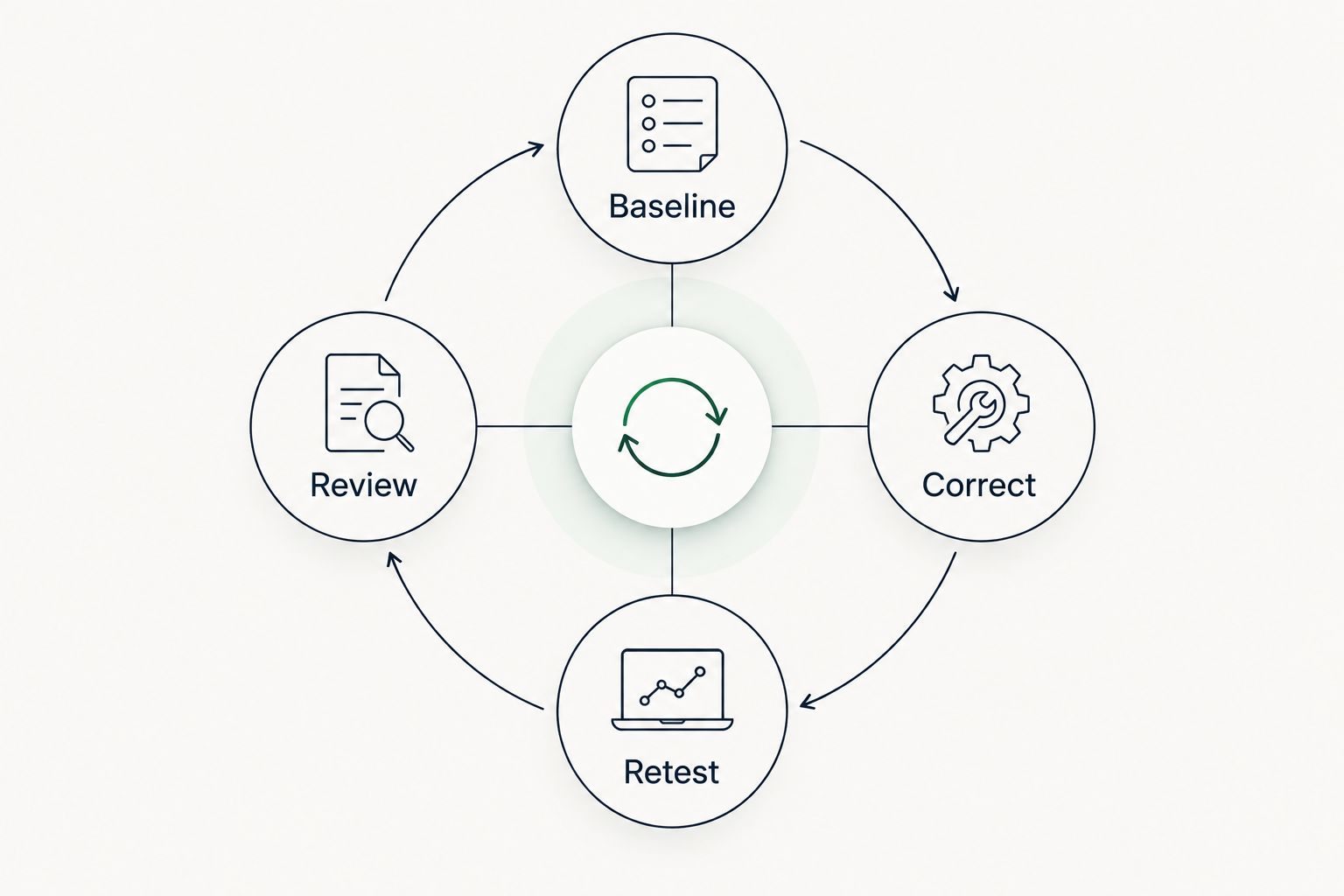
Your review should end with an owner and a next action, not just a score. Keep the scope small enough that someone can complete the corrections before the next meeting.
- Preserve the original prompt and answer evidence.
- Record the exact page or source change.
- Retest using the baseline prompt wording.
- Separate confirmed corrections from unresolved answer errors.
- Assign the next action to a named internal owner.
Compare options for childcare-centre teams
Choose the workflow according to what you need to observe. Manual checks expose individual answers; referral analytics describe visits; dedicated visibility software supports brand tracking. None removes the need to verify whether an answer describes your centre accurately.
| Option | Best for | Practical advantage | Key limitation |
|---|---|---|---|
| Manual checks and a spreadsheet | A centre establishing its first baseline | Lets you inspect the full answer and its visible sources | Repetition and consistent classification remain manual tasks |
| Existing website and enquiry analytics | Teams connecting visits to enquiries | Keeps visibility work connected to recorded website activity | Does not capture answers that produce no tracked visit |
| Koalr | Marketing teams tracking brand visibility across answer engines | Focuses on tracking and improving appearances in AI-driven answers | Childcare facts still require verification by your centre |
Start with approved facts and a usable prompt set before adding software. Evaluate Koalr’s answer engine optimization fit against your required platforms and location-level workflow; do not assume unverified capabilities from the category name.
Common mistakes childcare centres make
Testing only the group name
A branded question tests recognition, not discovery. Include unbranded questions about the relevant locality and care requirements, then report branded and unbranded results separately.
Treating a group page as a branch answer
A group-level description does not establish what an individual centre offers. Give each branch verified information and check whether saved answers attach facts to the correct location.
Publishing support claims without approval
General statements about inclusion do not describe every child’s circumstances. Publish approved explanations of your enquiry and assessment processes rather than promising an individual outcome.
Counting positive wording as factual accuracy
An enthusiastic recommendation can still contain an incorrect age group or inspection reference. Score correctness independently and prioritise misleading operational details over flattering language.
Moving private enquiry details into prompt tests
You do not need a child’s name or personal circumstances to test discoverability. Convert the enquiry into a general question and retain only the information necessary for the test.
FAQ
What is answer engine optimization for childcare centres?
Answer engine optimization for childcare centres means making verified nursery information easier for answer engines to find, interpret and cite. The work combines accurate location pages, parent-focused prompt testing and correction of misleading answers.
What should a childcare centre measure first?
Measure whether answers identify the correct centre and describe its facts accurately. Then distinguish mentions, source citations and recommendations rather than combining them into one success label.
Is answer engine optimization better than local SEO for nurseries?
Answer engine optimization does not replace local SEO for nurseries. Keep your location information and website accurate while adding tests that examine the answers themselves, not just search rankings or visits.
Can I check my nursery’s AI visibility manually?
Yes, you can check nursery visibility with a fixed prompt set and a spreadsheet. Save each answer with its platform, date, visible sources and factual errors so repeated checks remain comparable.
Which questions should I put in a childcare prompt set?
Include location discovery, age-group suitability, verified care arrangements and branded fact-checking. Base the wording on recurring parent questions and remove personal information before testing.
Does an AI citation mean a parent will enquire?
No, an AI citation does not establish that a parent visited your website or contacted your centre. Track answer appearances, referral visits and recorded enquiries as separate observations.
Can Koalr help a childcare marketing team?
Koalr helps marketing teams track and improve brand appearances across ChatGPT, Gemini, Perplexity, Claude, Copilot and Google AI Overviews. Your childcare team still needs to verify operational facts and approve public descriptions of each centre.
One last thing
Test whether your nursery is being recommended for the wrong reason. A visibility report that records only your name will miss an answer that associates your centre with care arrangements you do not provide.
Add a suitability check to every recommendation review: does the verified centre information actually match the parent’s stated requirements? In 2026, that is a more useful next action than celebrating an isolated mention. Correct the mismatch before expanding the content programme.