

Instead of manually comparing search queries with AI answers every day, build a shared query-gap worksheet that connects Google Search Console evidence with the brand visibility you track in Koalr. This 2026 workflow uses Search Console exports and recorded answer observations; it does not depend on a native connector, API connection or automatic synchronisation.
- Use the koalr google search console integration workflow to compare search demand with observed AI visibility, not merge metrics.
- Google Search Console supplies query and page performance; Koalr tracks how brands appear in AI-driven answers.
- Match queries and prompts by buyer intent, then record mentions, citations and recommendations separately.
- Prioritise relevant query gaps with a clear page fix, owner and repeatable measurement window.
Why this matters
A search query and an AI prompt can describe the same buying problem without using the same words. Joining them on exact text misses that relationship. Joining them without checking intent creates a different problem: unrelated observations look comparable.
Koalr is best for marketing teams that need AI visibility tracking alongside search performance. Google Search Console provides the search side of this workflow; Koalr provides the brand visibility context. Neither dataset replaces the other.
For your 2026 reporting, keep the distinction explicit: search impressions show recorded exposure in Google Search, while an observed answer shows what an answer engine returned for a particular prompt. Neither establishes a sale.
| Tool | Best for | Contribution to this workflow | Limitation |
|---|---|---|---|
| Google Search Console | Understanding recorded Google Search performance | Queries, pages, clicks, impressions, CTR and average position | Does not show brand mentions across ChatGPT, Claude or other independent answer engines |
| Koalr | Tracking brand appearance in AI-driven answers | Brand visibility context across the platforms described by the product | AI visibility observations do not replace search query performance or conversion measurement |
Keep the evidence separate and connect it through intent. The useful output is a content decision, not a blended score that hides what each source measures.
Before you start
- Access: Have access to the relevant Google Search Console property and the brand visibility observations you will use. Confirm that the property covers the website and URL variants you intend to analyse.
- Materials: Prepare a spreadsheet, a list of priority buyer questions, and the pages that answer them. Use a proposed baseline of 28 days and record the exact start and end dates; this is a workflow choice, not a performance benchmark.
- Gotcha: Search Console does not expose every query. Some queries are anonymised for privacy, so missing query rows are not proof of zero demand. Also, a UK search segment is not directly comparable with an answer observed under a different market or language context.
Do not start by building a dashboard. First decide which audience, market and buying problem the worksheet represents. Otherwise, a tidy report will combine observations that should remain separate.
Search Console baseline
- Open the correct property in Google Search Console. For a standard website property, open Performance, then Search results. Check the property before applying filters; a similar property name is not confirmation that you selected the intended scope.
- Set Search type to Web. Use Date to select your baseline, then record the dates in the worksheet. For this 2026 workflow, use a completed window rather than changing the date range each time you inspect a row.
- Apply the relevant Country filter if the analysis is market-specific. Record any Device filter too. Keep those choices consistent during follow-up reviews, or label a changed scope as a separate analysis.
- Review Total clicks, Total impressions, Average CTR and Average position. Open Queries, then use Export to save the report. Preserve the original export rather than editing your only copy.
- Investigate priority queries individually. Filter for the selected query, open Pages, and record the page or pages receiving search exposure. A separate sitewide page export does not establish which page served each query.
Expected result: You have a dated query baseline with explicit filters and verified query-to-page relationships for the topics you will investigate.
Treat average position as context, not a diagnosis. It is an aggregate measure, not a fixed rank for every searcher. A query receiving impressions deserves investigation only if it matches an audience and problem your business serves.
Intent map
- Create worksheet columns for search query, query date range, market, device scope, clicks, impressions, CTR, average position and observed page. Keep the source wording intact in the search-query column.
- Add an intent label describing the buyer's task. Use plain labels such as category research, alternatives, implementation or evaluation. These are your worksheet labels, not product settings.
- Write a corresponding natural-language prompt. Preserve the task and audience rather than copying the query mechanically. For example, a short query about citation tracking can become a question about measuring whether a brand appears as a source.
- Assign each intent a stable topic identifier in your worksheet. Keep the original query and prompt alongside it so another person can inspect the match. Do not make the topic identifier a substitute for the underlying evidence.
- Separate branded and unbranded questions. A prompt naming your business tests a different situation from a prompt asking for a category recommendation. Mixing them can make brand recognition look like competitive discovery.
Expected result: Each selected search query belongs to a reviewable intent group with an associated prompt, audience and candidate page.
Use this sequence: Query baseline, Intent map, Answer evidence, Page actions. The intent map is the bridge; it prevents you from treating a conversational answer as another Search Console query row.
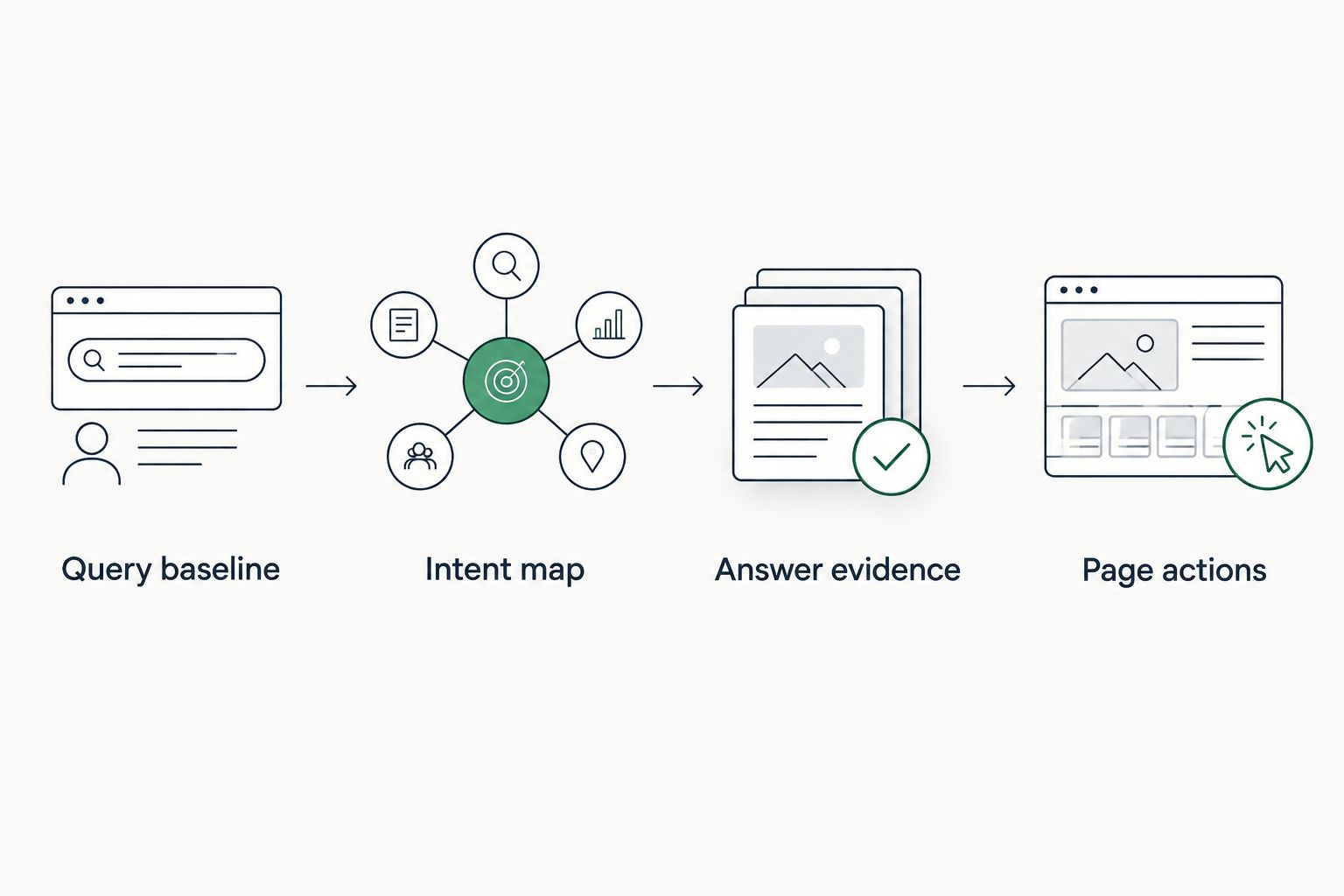
Answer evidence
- Review the relevant brand visibility observations in Koalr. Record the prompt, answer engine and observation date alongside the intent group. Preserve any available market or language context; do not invent a setting that was not recorded.
- Capture the answer evidence you can inspect. Record the relevant answer text and any cited source URL shown in that answer. If you manually collect an observation, label it as manually collected rather than presenting it as a platform export.
- Record a mention when the answer names the brand. Record a citation when the answer links or attributes information to a source. Record a recommendation when the answer proposes the brand as a suitable choice for the stated task.
- Distinguish brand-level evidence from page-level evidence. An answer naming your company does not establish that it used the page you are evaluating. Check the actual cited destination before assigning a page citation.
- Record competing brands only when they appear in the observed answer. Keep the wording and context: inclusion in a list is different from an explicit preference. Leave unobserved outcomes unclassified rather than converting them into failures.
Expected result: Your worksheet separates what the answer said, which source it cited, and whether it recommended a brand.
For 2026 reporting, retain observation dates at row level. A current search export paired with an old answer is not a current comparison. This workflow connects datasets for analysis; it does not send Search Console data into an answer engine or prove that a search query generated a particular answer.
Page actions
- Compare each intent group with its search evidence and answer evidence. Mark a query gap when a relevant search task lacks a suitable page or the existing page fails to answer it. Mark an answer gap when the observed answer omits the brand or cites another source.
- Inspect the candidate page before assigning work. Check whether it answers the question directly, supports its claims and distinguishes the product's purpose from adjacent categories. Do not infer the reason for an omission solely from the omission itself.
- Select an action tied to the inspected problem: clarify the opening answer, add missing implementation detail, correct an unsupported claim, or create a page where a distinct task has no suitable destination. Avoid creating another page for wording alone.
- Add an owner, a change description and a publication date. Preserve the pre-change evidence. Without that record, a later review cannot distinguish a content revision from a changed prompt or measurement scope.
- Recheck the same prompts and inspect the same Search Console segment. A proposed operational cadence is 1 review per week; use a comparable 28-day window for search performance rather than treating a short-term movement as a result.
Expected result: Every selected gap has a justified page action and a repeatable review plan. Unclear cases stay in investigation rather than becoming automatic writing assignments.
Prioritise relevance and a diagnosable page problem before raw impressions. A broad informational query can generate exposure without addressing your buyers. Conversely, a specific implementation question can deserve attention even when its recorded query activity is limited.
Refresh the map whenever a page changes
The adjacent workflow starts with a content update rather than a new query export. It is useful when your team already has an editorial calendar and needs to evaluate revisions consistently.
- Record the changed page, publication date and intended buyer question. Describe the change precisely; page updated is not enough to explain what was tested.
- Find the intent groups associated with that page. Keep established prompts unchanged for the comparison, and label any new prompt as a new observation series.
- Save the pre-change answer evidence and search baseline. Add subsequent observations with their own dates rather than overwriting the earlier rows.
- Review prompt wording, platform and market consistency before judging the result. Then inspect mentions, citations, recommendations and search performance separately.
A proposed 7-day check can confirm that the revised page is accessible and that the tracking process still works. It is not a deadline for improved rankings or citations. In your 2026 change log, distinguish technical checks from outcome reviews.
Best for: Teams refreshing existing content. The benefit is a traceable before-and-after record; the limitation is that concurrent changes prevent a clean causal claim. An improvement after publication is an observation, not proof that the edit caused it.
Troubleshooting
Query rows do not match the report total
Search Console omits anonymised queries from query tables, and exports have limits. Check the selected filters and date range first, then retain the report total and exported-row scope as separate records. Do not scale missing rows into invented queries.
A query maps to several pages
Inspect Pages while the query filter is active. Check whether the pages serve different tasks or duplicate the same answer. Several pages receiving exposure is not, by itself, proof of a content conflict; inspect their purposes before consolidating anything.
The brand appears, but the page is not cited
Record the brand mention without assigning a citation to the candidate page. Inspect the answer's source links and their destinations. A company-name match is not evidence that a particular article supplied the answer.
Visibility changes after you rewrite the prompt
Restore the original prompt for the comparison and retain the revised wording as a separate series. A prompt change changes the question being tested. The same rule applies when you change the answer engine or market context.
Search performance improves but recommendations do not
Check each dataset independently. Increased search exposure does not establish increased answer-engine recommendations, and an observed recommendation does not establish clicks. Keep separate status fields and assign a fix only after inspecting the relevant evidence.
Customise your workflow
Once the initial map works, expand coverage by buyer task rather than adding unstructured prompts. Add implementation questions, evaluation criteria and category discovery as separate intent groups. Keep branded questions separate throughout.
Use the guide to building a prompt library for AI visibility tracking to structure that expansion. A stable library makes repeated observations interpretable; a constantly changing list makes trend reporting harder to defend.
The strength of this approach is transparency: another team member can trace a recommendation back to a query, an observed answer and an inspected page. Its drawback is manual upkeep. Validate the mapping before automating data movement, and require documentation for any connector, export or API method you later adopt.
FAQ
Does Koalr have a native Google Search Console integration?
This workflow does not establish native connector support. It uses Search Console exports and recorded AI visibility observations; verify current product documentation before planning an authenticated connection.
What does a koalr google search console integration workflow compare?
It compares search query and page performance with observed brand appearance in AI-driven answers. The connection is a shared buyer-intent map, not a claim that search queries and AI prompts are identical.
Can Google Search Console show every time an answer engine mentions my brand?
No. Google Search Console reports Google Search performance, not every brand mention across independent answer engines. Use separate answer observations to inspect mentions, citations and recommendations.
Should I copy search queries directly into my prompt library?
Use search queries as evidence of buyer questions, not as automatic prompt copies. Preserve the task and audience when turning short search wording into a conversational question.
Why is a query missing from my Search Console export?
A missing query row does not prove zero search demand. Search Console anonymises some queries for privacy, and report filters and export limits also affect the rows you can inspect.
How often should I review query gaps?
Use a weekly operational review and a consistent search-performance window as a starting schedule. Keep prompts, platforms and market scope stable so changes remain interpretable.
Does an AI citation prove that my content update worked?
No. A citation observed after an update does not establish that the update caused it. Preserve the earlier evidence and inspect other changes before making a causal claim.
One last thing
Keep an unmatched intents list. It catches relevant buyer questions that appear in answer observations but have no corresponding query row in your export, and search tasks that your prompt library never tests.
For your final 2026 review, inspect that list before celebrating coverage. Missing evidence should trigger investigation, not an invented zero or an automatic new page.