

Integrating AI visibility alerts into Slack means connecting your AI answer engine tracking tool to a Slack channel so drops in Share of Voice, lost citations, or a competitor overtaking your brand in ChatGPT or Gemini answers post automatically, without anyone checking a dashboard.
The setup takes minutes once the tool supports it: authorize the Slack workspace, pick a channel, choose which events trigger a message, and set the thresholds that matter to your team. The part most teams get wrong isn't the connection itself, it's the alert logic — too many triggers and the channel gets muted by week two.
- AI visibility alerts slack integration works by connecting a tracking tool's webhook to a Slack channel via OAuth, no engineering ticket needed.
- Set thresholds on Share of Voice drops and citation loss, not every score fluctuation, or the channel gets muted within weeks.
- Route competitor-overtake alerts to a different channel than routine benchmark updates so marketing and leadership see what matters to them.
- 2026 alert setups increasingly separate 'urgent' (lost citation on a money page) from 'informational' (weekly Share of Voice digest).
Why this matters
AI answer engines refresh what they cite constantly. A brand that shows up in ChatGPT's answer to a category question this month can disappear from that same answer next month if a competitor publishes fresher content or earns a stronger third-party citation. Checking a dashboard weekly means you find out days after the drop already happened.
Slack alerts close that gap. The team that owns the response — content, PR, or product marketing — sees the change the day it happens, in the channel they already work in, instead of during a monthly report review. That's the whole value case for AI visibility alerts slack integration in 2026: speed from detection to action, not a new dashboard to check.
How to integrate AI visibility alerts into your Slack workflow
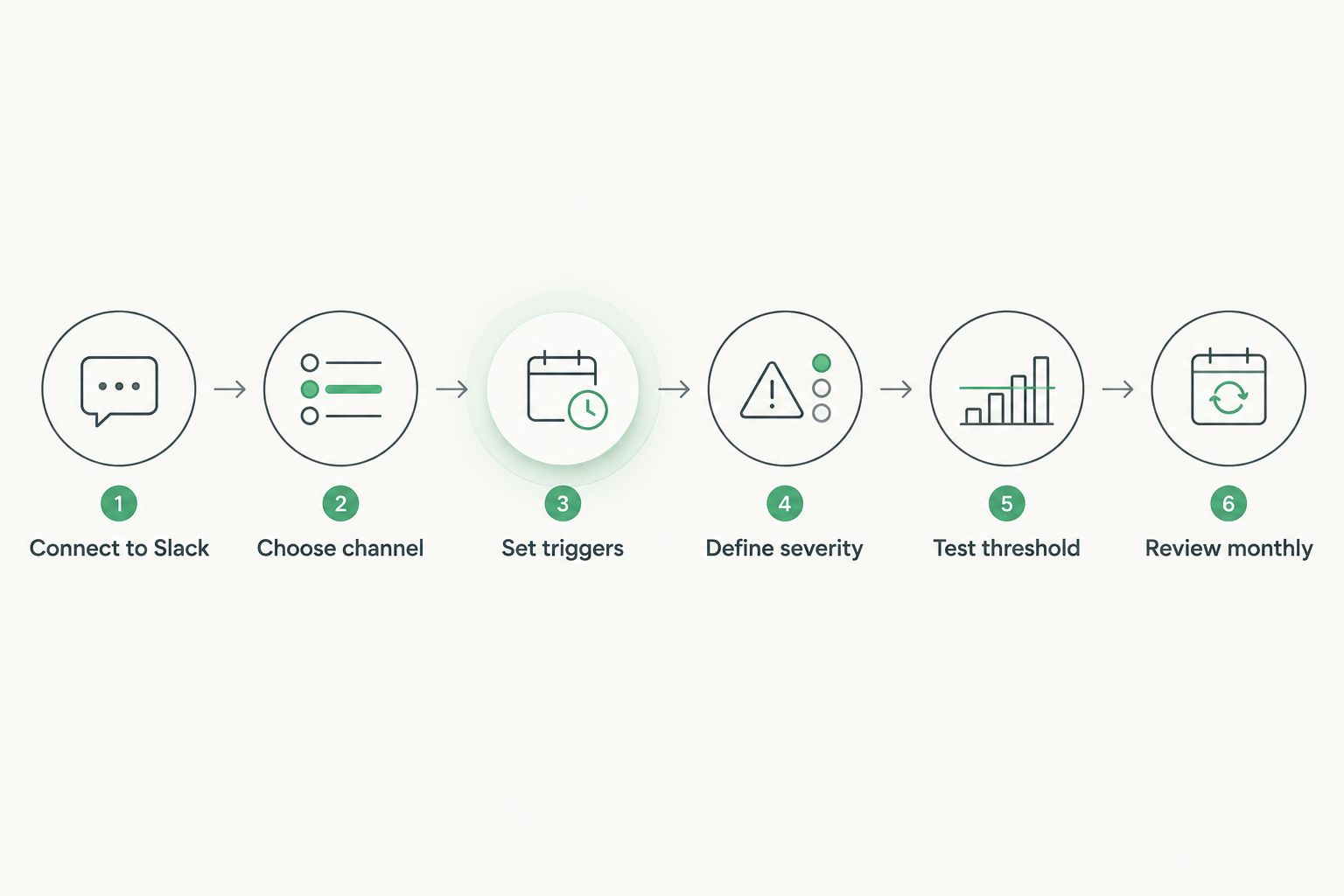
- Connect the tracking tool to Slack. Most AI visibility platforms, including Koalr, use Slack's standard OAuth flow — authorize the app from the tool's settings page and pick the workspace.
- Choose the destination channel. Route alerts to a channel your content or SEO team already watches, not a general-purpose one that gets muted.
- Set your alert triggers. Common ones: Share of Voice drop past a threshold, a citation disappearing from a tracked prompt, a competitor newly appearing in an answer where you used to rank.
- Define severity levels. Separate urgent triggers (lost citation on a revenue-driving page) from routine ones (weekly benchmark summary) so the channel doesn't flatten everything into the same tone.
- Test with a dummy threshold. Lower the trigger temporarily to confirm the message format, mentions, and channel routing work before trusting it in production.
- Review the alert list monthly. Prompts and competitors shift; a trigger set up in January 2026 may be irrelevant by summer if the prompt set has changed.
Urgent alerts: citation loss and competitor overtakes
These are the alerts that justify interrupting someone's day. A brand losing its citation on a high-intent prompt, or a named competitor appearing in an answer where your brand used to be the only one mentioned, both signal something changed in the underlying content or the model's source weighting. How to tell if a competitor beats you in AI search answers breaks down what "beats you" actually means before you build an alert around it.
Routine alerts: weekly Share of Voice digests
These don't need real-time delivery. A Friday-morning digest summarizing the week's Share of Voice movement across your tracked prompt set gives the team a rhythm without training everyone to ignore the channel. Teams running a structured cadence around this often pair it with how to run a monthly AI visibility benchmarking review so the Slack digest and the monthly report use the same numbers.
Why alert setup varies by team
- Prompt set size — a team tracking 20 prompts needs fewer, tighter triggers than one tracking 200 across multiple markets.
- Number of tracked competitors — more named competitors means more potential overtake events, which pushes teams toward a digest format instead of real-time pings.
- Team size and ownership — a solo marketer wants everything in one channel; a larger team splits urgent and routine into separate ones.
- Product launch cycles — alert sensitivity often gets tightened temporarily around launches, then relaxed afterward.
- How the data feeds leadership reporting — teams that already have a process for presenting AI visibility metrics to leadership tend to keep Slack alerts operational and save narrative framing for the report itself.
Set up your first AI visibility alert
Connect your prompt set to Slack and catch citation loss the day it happens.
Related questions
Does Slack alert on every AI platform (ChatGPT, Gemini, Perplexity, Claude)?
A Slack integration alerts on whatever platforms the underlying tracking tool monitors — if the tool tracks ChatGPT, Gemini, Perplexity, Claude, Copilot, and Google AI Overviews, the alert can be scoped to any one of them or to all of them combined. Scoping to a single platform is useful when a team is specifically watching a rollout of a new AI Overview feature or a Perplexity algorithm shift in 2026.
How many alerts should a marketing team run at once?
Most teams settle on 3-5 active triggers per prompt set: one for Share of Voice drops, one for citation loss on priority pages, one for new competitor appearances, and optionally a weekly digest. Running more than that without splitting channels by severity is the fastest way to get a channel muted.
Can Slack alerts replace a monthly AI visibility report?
No — Slack alerts catch sudden changes in real time, but they don't replace the trend analysis a monthly report provides. A monthly AI visibility benchmarking review still matters for spotting slower, gradual shifts that no single alert would trigger.
Alert fatigue kills more Slack integrations than bad triggers do — mute the routine and keep only what someone should act on today.
FAQ
How do I set up AI visibility alerts in Slack?
Connect your AI visibility tracking tool to Slack through OAuth, choose a destination channel, and set triggers for events like Share of Voice drops or lost citations. Most platforms complete this in under ten minutes without needing an engineer.
What triggers should an AI visibility Slack alert use?
The two triggers most teams keep are Share of Voice drops past a set threshold and citation loss on priority pages. Adding a competitor-overtake trigger and a weekly digest covers most use cases without overloading the channel.
Is real-time alerting necessary for AI visibility tracking?
Real-time alerting matters most for urgent events like citation loss on a revenue page, but routine metrics work better as a scheduled digest. Mixing both formats in one channel usually causes the channel to get muted.
Can I route different AI visibility alerts to different Slack channels?
Yes, most integrations let you route by severity or by platform, so urgent citation-loss alerts go to one channel and routine Share of Voice digests go to another. This separation is what keeps teams actually reading the alerts in 2026.
Do Slack alerts work across ChatGPT, Perplexity, and Gemini separately?
Alerts can be scoped to a single AI platform or combined, depending on what the underlying tracking tool monitors. Scoping to one platform helps when a team is watching a specific rollout, like a Google AI Overview change.
How often should I review my AI visibility alert settings?
Review alert triggers monthly, since prompt sets and tracked competitors shift over time. A trigger that made sense in January 2026 can become irrelevant or too noisy by mid-year without a review.
What's the difference between a citation, a mention, and a recommendation in an alert?
A citation is a direct source link in an AI answer, a mention is the brand name appearing without a link, and a recommendation is the AI explicitly suggesting the brand as the answer. Alerts should specify which one triggered them, since the three carry very different weight.
One last thing
The teams that get the most out of AI visibility alerts slack integration don't start with more triggers — they start with fewer, and add one at a time as they confirm each one drives an actual action. A channel with two well-tuned alerts that people read beats one with ten that gets muted by February 2026.