

Coworking space answer engine optimisation is the practice of making your workspace easier to identify, verify and recommend in generated answers, with the aim of attracting relevant enquiries. This 2026 guide covers location-level content, buyer-intent prompts and measurement: a freelancer seeking somewhere quiet needs different evidence from a team comparing private offices.
- Answer engine optimization for coworking spaces starts with accurate location pages, not generic articles about flexible working.
- Separate mentions, citations and recommendations when measuring local discovery and generative engine optimisation.
- Koalr suits coworking marketing teams that need to track brand appearances across supported answer engines.
- Measure each location against relevant competitors; a brand-wide average hides local gaps.
Why answer engine optimisation matters for coworking spaces
A coworking recommendation needs context. Location, workspace type, access arrangements and suitability for calls determine whether a space answers the question; a broad claim about a vibrant community does not establish those facts.
Your task is to make the evidence available, then check whether generated answers represent it correctly. Begin with a prompt library for AI visibility tracking that separates neighbourhood searches from workspace requirements.
A mention is not a recommendation, and a citation is not an enquiry. Track these outcomes separately in your 2026 reporting. An answer can name your operator without recommending it, or cite a useful page without sending a visitor.
For coworking spaces, the practical challenge is matching a specific building to a specific need. Keep discovery, factual accuracy and commercial outcomes distinct so your team knows which problem to fix.
How to build your coworking answer engine strategy
1. Define the searches each location should answer
Start manually with tour enquiries, reception questions and conversations with members. Turn those questions into prompts without adding your brand name; otherwise, you test recognition rather than discovery.
Build an initial set of 12 prompts per location as a manageable starting exercise, not an industry benchmark. Divide them between neighbourhood discovery, workspace requirements and comparison questions. Include branded checks separately to test whether an answer describes your building accurately.
For example, test a request for somewhere suitable for frequent video calls near a named station. That question requires different evidence from a request for a private office for a small team.
Record the intended buyer and the location behind every prompt. Keep the original wording in your 2026 baseline, and version later additions rather than silently changing the test.
- Collect questions from enquiries and tours, removing personal information.
- Separate individual workers, visiting professionals and team buyers.
- Use real neighbourhood and transport names relevant to each building.
- Include requirements your space actually meets, not aspirational amenities.
- Keep branded accuracy checks outside your unbranded discovery score.
2. Turn location pages into verifiable answers
Audit each building page before commissioning more articles. Read it as someone who has never visited: can you establish what the workspace is, where it is and which uses it supports?
Use a spreadsheet to reconcile the page with operational records. Ask the location manager to verify the address, access arrangements, workspace types and facilities. Publish only confirmed details, and distinguish building-wide facilities from benefits tied to a particular membership.
Location-specific facts belong on location-specific pages. A portfolio page cannot establish whether a particular building has suitable call spaces or step-free access. Avoid copying the same amenities paragraph across every address.
Make the essential information visible in readable page text. Images can show the space, but a photograph does not explain access conditions or who can use a meeting room.
- State the building name, full address and workspace types clearly.
- Explain call spaces, meeting rooms and quiet areas where verified.
- Describe accessibility accurately, including relevant limitations.
- Distinguish staffed reception hours from member access arrangements.
- Add a named internal owner responsible for checking location facts.
3. Record mentions, citations and recommendations separately
Run your prompt set manually and save the complete responses. Record the engine, test date, prompt wording, search setting where visible and cited sources. Use a consistent location context rather than comparing answers produced under different conditions.
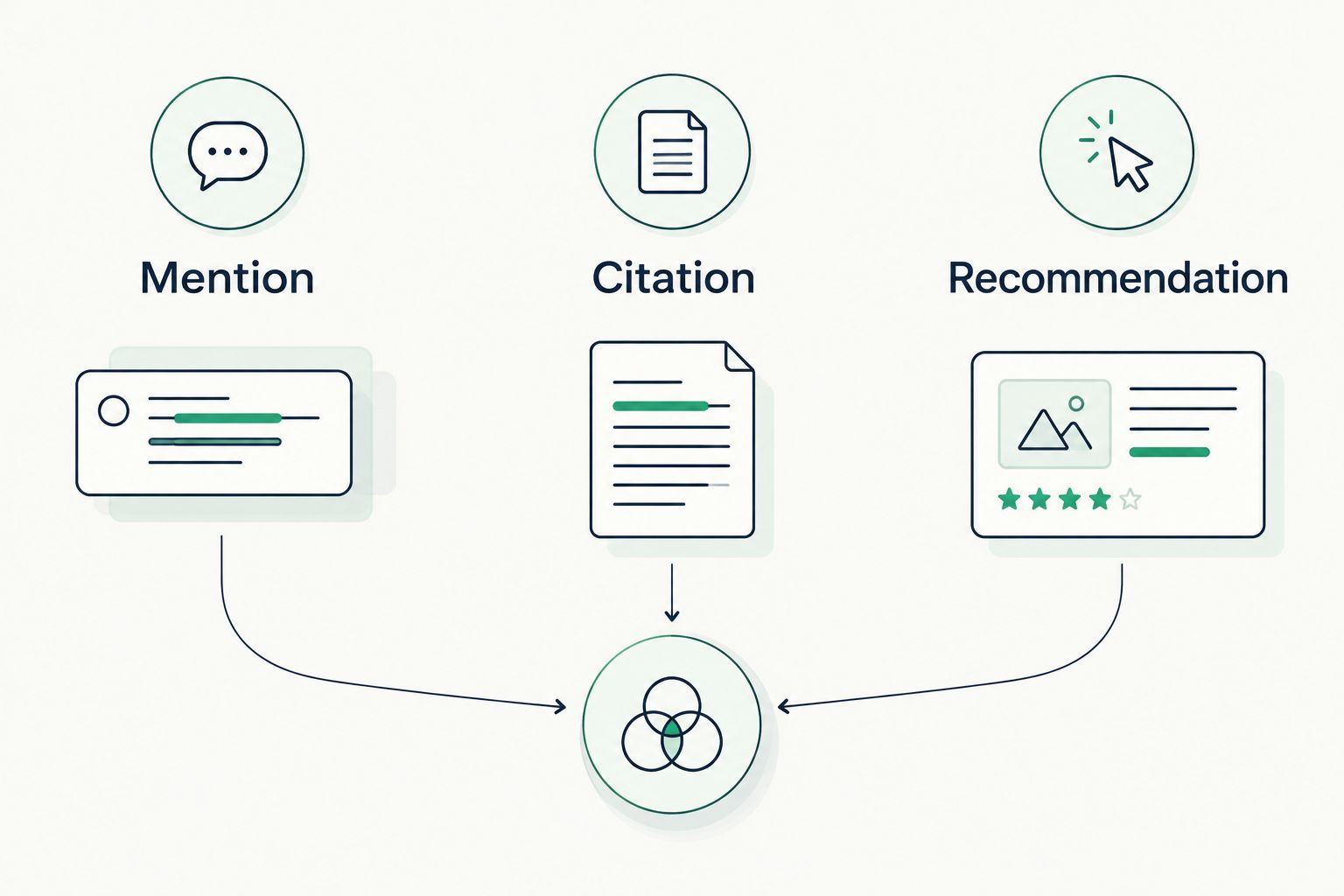
Keep 3 outcome categories: mention, citation and recommendation. A mention names your workspace. A citation identifies a source supporting the answer. A recommendation presents your workspace as suitable for the user's stated need. These outcomes can overlap, so do not force every answer into a single category.
For a starting exercise, run 12 prompts across 3 engines to produce 36 recorded answers per location. This is a suggested workload, not a representative market sample. Review the actual text alongside any totals.
Once that manual process is defined, Koalr provides a software path for tracking and improving brand appearances across its supported platforms. Koalr is best for coworking marketing teams that need AI visibility tracking across supported answer engines. It does not replace verification by your location managers.
- Record a mention when the answer names your operator or building.
- Record a citation when the answer identifies a supporting source.
- Record a recommendation when the answer connects your space to the need.
- Record factual errors separately from positive or negative visibility.
- Preserve the response text behind your 2026 baseline scores.
The categories below describe different evidence, not a guaranteed progression. A recommendation without a citation still needs an accuracy check; a citation without a recommendation still tells you which source appeared.
4. Fix the evidence behind inaccurate or missing answers
Inspect the sources attached to each answer before changing your website. Identify whether the engine cites your location page, a directory, an editorial guide or another source. Where no source is shown, record that limitation rather than inventing an explanation.
Check the cited material against your verified location facts. If a directory describes a former address or an unsupported facility, request a correction. If your own page leaves a key question unanswered, fix that page first.
Use consistent building names across your website and legitimate business profiles. Distinguish an operator name from the name of an individual location so that a portfolio-wide description does not become a claim about every building.
Structured data can describe information that is already present on the page. It is not a citation guarantee. Choose applicable types and ensure the markup agrees with visible, verified content.
- Compare cited pages with the facts approved by each location manager.
- Correct outdated addresses and inconsistent building names.
- Add missing answers to the relevant location page.
- Check that important pages load and expose their essential text.
- Keep structured data consistent with what visitors can read.
5. Publish content that resolves workspace decisions
Write for decisions your location can genuinely support. A useful page explains whether a workspace fits a stated requirement, what evidence supports that answer and what the visitor should confirm before enquiring.
Start with a plain-language answer, then provide the conditions. For a page about taking calls, describe verified call facilities and usage rules rather than claiming the building is perfect for remote workers.
Separate workspace types where the distinction matters. Hot desks, dedicated desks and private offices serve different arrangements; describe only those your business offers. A comparison should explain practical differences without presenting an unsupported winner.
Describe limitations as clearly as benefits. A reader assessing quiet work needs to understand the working environment, not just see a list of amenities. Specific boundaries make the page useful even when the space is not the right match.
- Turn recurring tour questions into short, answer-first sections.
- Tie every facility claim to the building where it applies.
- Explain workspace differences using verified operating arrangements.
- Include relevant limitations, such as shared areas or booking requirements.
- Remove generic introductions that delay the answer.
6. Compare competitors at the location level
Use the same unbranded prompts to compare your space with relevant alternatives. Save what the answers actually recommend and which sources they use. Do not substitute a list of familiar national operators for the competitors appearing in your local tests.
Keep the manual review focused: does the competing page answer a question yours leaves open? Look for explicit evidence about location, workspace type or suitability. A competitor citation is evidence of that citation, not proof that every part of its strategy works.
Define Share of Voice before reporting it. State whether you count brand mentions, recommendations or another outcome, and specify the prompts and competitors included. Without that denominator, comparisons are ambiguous.
Review contradictory outcomes too. A competitor can appear often while being described inaccurately; your aim is a correct recommendation, not merely a higher count.
- Compare spaces serving the same location and buyer requirement.
- Record the source supporting each competitor recommendation.
- Identify unanswered questions on your own location pages.
- State the denominator behind every Share of Voice calculation.
- Keep accuracy checks beside visibility comparisons.
7. Connect visibility improvements to enquiries
Create a change log before editing pages. Record the location, issue, evidence, change and responsible owner. Repeat the same prompt set after the update, retaining the original responses for comparison.
Use a 30-day review cycle as a planning choice, not a promise of results. Within that cycle, prioritise inaccurate building information before expanding content. Check urgent operational changes as soon as they occur rather than waiting for the next review.
Track referral visits and enquiry outcomes separately from answer appearances. Where your analytics identifies a referral, examine its landing page and subsequent action. Where the journey is not observable, do not attribute an enquiry to a citation.
Your 2026 report should end with decisions: which location needs a factual correction, which page needs a clearer answer and which test needs repeating. A rising score alone does not establish more qualified tours.
- Log each page change with its date and intended outcome.
- Repeat unchanged prompts under comparable test conditions.
- Record tour requests and enquiries without assuming their source.
- Review visibility, accuracy and commercial outcomes separately.
- Assign the next action to a named owner.
Compare your measurement options
Choose the method that answers your immediate question. Manual review shows the response itself; analytics shows observable visits; a visibility platform supports tracking brand appearances. None establishes the complete customer journey on its own.
| Option | Best for | Advantage | Key limitation |
|---|---|---|---|
| Manual answer checks and spreadsheet | Establishing a baseline for selected locations | Lets you inspect wording, sources and factual accuracy directly | Repeating and documenting checks requires staff time |
| Website analytics | Understanding observable referral visits and enquiry actions | Connects recorded visits with on-site behaviour | Does not record answer appearances that produce no visit |
| Koalr AI visibility software | Marketing teams tracking brand appearances across supported answer engines | Provides a software approach to tracking and improving visibility | Does not replace location fact-checking or enquiry measurement |
Start with manual checks; add software when repeated tracking becomes the bottleneck. Keep website analytics alongside either approach rather than treating it as a substitute for answer inspection.
Common mistakes coworking spaces make
Treating portfolio visibility as local visibility
A recommendation for your operator does not establish visibility for every building. Report by location and buyer need before aggregating results, and keep locations with different facilities separate.
Publishing facilities without their conditions
A meeting room listed without usage conditions leaves an important decision unanswered. Verify who can use it and under what arrangements; do not let a building-level amenity imply an inclusion for every membership.
Testing only prompts that name the brand
Branded prompts test recognition and accuracy. They do not establish whether your space appears when someone asks for an unnamed local recommendation. Maintain distinct branded and unbranded test sets.
Counting every citation as commercial success
A cited workspace guide is not necessarily a recommendation for your building. Record the cited page, the answer's wording and any observable referral separately before drawing a commercial conclusion.
FAQ
What is answer engine optimization for coworking spaces?
Answer engine optimization for coworking spaces means making workspace information easier to identify, verify and use in generated answers. It combines accurate location content with checks of mentions, citations and recommendations.
What's the best first step for a coworking operator?
Verify the facts on each location page before creating more content. Check the address, workspace types, facilities and access arrangements against current operational records.
Is a brand mention the same as a recommendation?
No: a mention names the workspace, while a recommendation presents it as suitable for the user's needs. A citation is a separate reference to a supporting source.
Should I track every coworking location separately?
Yes: track each location against prompts relevant to its area and facilities. A portfolio-wide total does not show whether a particular building appears for its intended buyers.
Can website analytics measure answer engine visibility?
Website analytics measures observable visits, not every appearance in generated answers. Use response checks alongside analytics to distinguish visibility from referral activity.
Does schema markup guarantee an answer engine citation?
No: structured data does not guarantee a citation or recommendation. Use applicable markup that agrees with visible, verified page information.
Where does Koalr fit into coworking marketing?
Koalr helps marketing teams track and improve brand appearances across its supported answer engines. Use it alongside verified location information and separate measurement of visits and enquiries.
One last thing
An unsuitable recommendation is an accuracy problem, not a visibility win. Add a suitability check to your 2026 reporting: did the answer recommend your building for a requirement it actually meets? Correcting that mismatch is more useful than celebrating another mention.